Tuesday, 17 January 2017

One Last Update For Internet Explorer 8.0 on XP


Microsoft decided to release One Last Update For Internet Explorer 8.0 for Windows XP on the 30th April 2014 after officially pulling the plug on the 8th of April 2014.

The browser update was released right across the board for XP including the embedded IE6  built into XP and also for the IE7 and IE8 updated browsers on both x86 and x64 Xp systems.

Although oddly the KB search on the update catalogue site  provides No results, the files where still on the microsoft download site.

They where named as follows

WindowsXP-KB2964358-x86-custom-ENU.exe (for the onboard IE 6)
IE7-WindowsXP-KB2964358-x86-custom-ENU.exe
IE8-WindowsXP-KB2964358-x86-custom-ENU.exe

WindowsServer2003-KB2964358-x64-ENU.exe (for the onboard IE 6)
IE7-WindowsServer2003-KB2964358-x64-ENU.exe
IE8-WindowsServer2003.WindowsXP-2964358-x64-ENU.exe


Updated 17th January 2017:

WARNING:

For the genuine none PosReady users i hate to say it but "Windows Update" along with "Microsoft Update" and the windows "Auto Update" no longer offer users the KB2964358 update.

Also the most modern Cumulative Security Update for Internet Explorer 8 Windows XP   they now offer users is KB2879017, which is oddly dated 23rd September 2013.

That's a far cry from even KB2909210 released on the 10th February 2014, one could say "yeah but you also get KB2632503 and KB2510531" but lets take a closer look at what they both really are and remind our selves just.. what they where.

KB2632503
IE8-WindowsXP-KB2632503-x86-ENU.exe, well this thing replaced KB976662 which in turn was also replaced by KB2510531... bah humbug... All confusion aside if i was to just name something people would remember and suddenly you realise its been missing a while.

What if i renamed IE8-WindowsXP-KB2632503-x86-ENU.exe
                         Into      WindowsXP-KB2632503-JS58-x86-ENU.exe

see that JS58? and suddenly its gone from kinda like this...

Description: Install this update to improve Internet Explorer 8's JSON interoperability in conformance with the new ECMAScript, fifth edition standard. After you install this item, you may have to restart your computer. (even that lacks the old term JScript)

Into

Description: Install this update to resolve issues in Windows. For a complete listing of the issues that are included in this update, see the associated Microsoft Knowledge Base article for more information. After you install this item, you may have to restart your computer. 
 
So what about this one ?

KB2510531
IE8-WindowsXP-KB2510531-x86-ENU.exe
Just what's under the hood of this one ?
Well do you remember getting another update every month along with JScript?  Only this one was for ActiveX Killbits?  well that's what it is. (and this things dated March 2011)

Doesn't it make you wonder what ever happened to the CAPICOM-KB931906

Description: This update resolves a security vulnerability in the redistributable component CAPICOM (versions prior to 2.1.0.2) which could result in remote code execution.

So if your updating a bog standard XP online then your missing at the very least, KB2909210, KB931906, KB931906 and KB2964358. Its no wonder KB2925418 got pulled by what people are describing but that's just the last one (that's the March 2014 Cumulative Security Update for Internet Explorer 8, 9 & 10)

If we where to talk "Conspiracies" and say (just for imaginative example) That between October 2013 and April 2014.. a company leased the telemetry code and fed it into users machines to gather stats for windows 10 and also this idea of users essentially "Torrenting Updates with windows 10" to save a company a load of bandwidth...

Then the lease runs out, so in turn, any updates featuring that code get pulled. Kinda looks like that  MS good deed of.. "here people you can have IE8-WindowsXP-KB2964358-x86-custom-ENU.exe"  but then  "advising us" its best to install it right after a roll up.. conveniently being IE8-WindowsXP-KB2925418-x86-ENU.exe seems more like a slap in our face than a good deed.

So users formatting, partition restoring and updating

Your using a JScript from the 4th of March 2011
Your using ActiveX Killabits from 28th October 2011
and a IE Cumulative Security Update from the 23rd of October 2013

and yet support ended 8th April 2014? and one assumes your fully updated to that 8th of April? because it lets you get the downloads...?

False sense of security is even more false than one can imagine...
i get the moaning that some updates were telemetry fixes.. but theirs no way from March 2011, Oct 2013 to April 2014 their wasn't major security or other bugs fixed.

When i set up an XP x64 SP2 (with IE 8) I get offered the same set of KB Numbers.

So remember, although support ended in April 2014, the browsers patch rate is October 2013, one runtimes from March 2011 and the others from October 2011... Hell... does this mean they've been officially data mining info since march 2011, escalated it in october 2011 and went in for the kill in 2013?... April 30th 2014 looked like someone was scooping up the dregs before pulling the plug.

And people wonder why i maintain this blog...

So if it has been safe using just these 3
IE8-WindowsXP-KB2510531-x86-ENU.exe
IE8-WindowsXP-KB2632503-x86-ENU.exe
IE8-WindowsXP-KB2879017-x86-ENU.exe
Since october, then just wtf was with the next 5 cumulative updates....

The strange thing is the April 2014 Update ISO listed here points to a dead page here and yet the file listed here that link currently works. Notice how when searching on the DL site it has the word FREE next to it here, one wonders when a BASKET is going to appear with a £ or $ sign ?  
Meanwhile everyone with Windows 10 is Seeding Updates by default on users own bandwidth... just like wtf...


Updated April 2017:

WARNING:

Microsoft have released another out of life cycle patch for Windows XP users, however it only appears available for XP-SP3 with IE 8

The file names are
IE8-WindowsXP-KB4018271-x86-custom-ENU.exe
IE8-WindowsXP-KB4018271-x64-custom-ENU.exe

They didn't release one for the IE6 or IE7.  Nor will KB4018271-x86  Install on Windows Fundamentals for Legacy PC's.  Do NOT post ini file hacks in the comments for installing KB4018271.  Keep the blog Clean and LEGAL!


Saturday, 24 December 2016

Windows XP Service Pack 4


These are my random thoughts on what I would essentially call a Fan Made Service Pack 4 for Windows XP. Some hail it as epic, some slant it as untrustworthy... Let me know what you think of it in the comments and i shall give you my opinions on it as follows....

First off, it's a great idea and im sure it took a lot of work but it lacks a lot of legalities, the permission to use the reg tweaks is great but the implementation of them and the PosReady fix along with microsoft stuff released After April 2014 makes the pack illegal.

It would of been nice to have a semi legal release that just caps off the official life cycle of the OS. The removal of the need to validate media player 11 also causes legal issues with using it.

The reg tweaks should be a Folder under Admin tools with a Reg key for ON and OFF regarding each feature. The packs not sterile because it wont suit all users or network environments unless the user is pc savi to change these settings.

The fact its had the PosReady patch slipped in & yet it hasn't had the Download ActiveX stuff put in for "Microsoft Update" seams also really stupid to only have Windows Update included. If your going to try and integrate .Net 3.5 then clearly windows should be using Microsoft Update (update windows AND OTHER microsoft products) Such as Microsoft .NET

.Net 3.5 included but yet no PowerToys Included ?
why no TweakUI or even AutoRuns placed within the Program Files dir?
IE 8 and yet no Silverlight ?

I see 37 updates on windows update as of today (for PosReady) You realise a system will automatically break the law if auto updates are enabled. It's such a shame because this pack could of truly been an SP4 and then an optional version. Its a lot easier to End a Pack than make one that still essentially needs more. It also should of blocked out MSE and hid it on windows update to avoid offering users to install an AV that actually no longer works.. (win update offers the newer MSE which is clearly dead and an older version is needed) It doesn't even hide the update for the End of support notice, were was the imagination once this pack began?

Microsoft .NET 4.0 is offered on windows update (not .NET 4.5.2) this in turn (after installing 4.0) will bring an unleash a mass of 40+ updates relating to .Net 1.1, 2.0, 3.0, 3.5 and 4.0 when a merged reg key for 4.0 could of had it offer 4.5.2 and cut down on a stack of the follow on updates.

I have tested the SP4 on Xp Home OEM, XP Professional (Corporate VLK) both harddrive tower based and i have tested it on a Windows 7 Professional running the Virtual XP-MODE with the XP Professional OEM, same results on all 3, it works. XPS Viewer, yet no taskkill.exe added to home. I clocked qefcheck is in and yet no permanent copy of qchain.

I mean if a packs going to break laws and step over the line, step off the kerb to do that bit more, why just tip toe, why that iddy didy bit after what must of been masses of work? to overlook the small easy tasks ? DirectX isn't anywhere near what it should be neither.  What about the patched UX theme dll, why was it not included?

This SP4.. It's such a cool idea and yet a waste of time using it. Even for offline gamers, the Dx Online updater tool is going to offer more DX components (once certain games are installed) at some stage it wont be safe at all to hook XP to the web to download something. Things change over the years.

It just leaves a lot to be desired really in what it could have been capable of. I will be sticking to my own BAT scripts to update a pre-installed XP environment offline and my own bat scripts when slipstreaming separate updates into a custom OEM replacement image for servicing systems.

A fantastic idea with to many ideas above its station and not enough imagination.
frankly this comes across more like a "Roll Up" than a XP farewell finale, frankly he fkd this up.

You can download it from MajorGeeks, just google search  WindowsXP-USP4-v3.1b-x86-ENU.exe

If your looking to keep your XP legal (but having problems browsing microsoft servers with IE 8.0) the check  out the little archive were making here
ber in mind that Microsoft Update and Windows Update (the ActiveX Control certificate is Signed & Dated) that Root Certificate will expire one day.. so the page here will be important one day im sure.

Saturday, 17 December 2016

SyncToy Isn't Deleting Files ?

So your microsoft SyncToy Echo Isn't Deleting Files from the right folder (right hand side) ?

I have seen this going on a few forums and i don't understand why people can't get there heads around it.. so i shall try and explain.

When you select Echo mode you MUST start with an Empty Folder (the right folder must be empty)

There is a perfectly good reason for this, one such as it stops synctoy from ever removing a pre-made folder on a drive, like as system restore, recycle bin, hive file and so on.

SyncToy also Creates  TWO files when you create a folder pair.. One in the Right side & One in the left. They both hold a list of the contents of the folders/drives and there sizes. This is why SyncToy knows a files and amount of files and sizes on the Right has changed in comparison to the file on the Left (without having to tick the "check files contents" option) which actually when ticked (it takes longer to scan) because it does an MD5 compare on both sides, handy incase a files size is the same but corrupt.

It scans so fast without it due to the   TWO   dat files it creates
IF you started with the RIGHT side having any contents (THEY'LL NEVER BE MODIFIED) You MUST START with an  Empty the right side AND  delete BOTH the dat files and then re-create the Folder Pair SetUp from scratch.

The dat Files look like this, it should stand out.. its the one file that wasn't originally put in any folder by you.. Note the Numbers in your file wont be the same as mine, but the two file(s) will look like this
SyncToy_6ec6e2a3-6c63-4267-a8a0-32fd09660c71.dat

Friday, 14 October 2016

FIX A script on this page may be busy, or it may have stopped responding


Here is something a lot more people are currently facing and we asked our nerd to do what he does

A script on this page may be busy, or it may have stopped responding

Common problem isn't it?, even for PC techs who have hunted high and low for Malware, reset settings, UN-installed browsers, Re-Installed browsers, updated java, updated flash, shockwave and nada, same old problem and your thinking CPU or hard disk issues, maybe ram..

Just some web pages, especially really active facebook profiles or facebook pages with masses of links to external content and bang, the browser just hangs and says not responding.

Anyways (bob) our wacky bug hunter decided to look at this problem from another perspective. He has this massive argument relating to web browsers and people who don't update internet explorer. I don't use it they say, so i don't update it they say, and he says it's an out dated web browser that can be used by malware, its an active door that's out dated you must update it even f you don't use it, regardless of the security implications you must realise that a Proxy, and other winsock kinda stuff is managed via Internet Explorers Options regardless of what browser you use, your main browser still depends on Components related to internet explorer and their lays the problem with newer versions of Windows and a simple fix relating to Power settings.

This Is Wrong
This Is Correct

If you still have problems after this then its a Real script error or malware, but this has been tested and it solved the problem on the specific machine we contacted him over. Both where set to use less power on ALL the power profiles, we just changed it, restarted machine and no more facebook script problems.


Tuesday, 11 October 2016

Microsoft Security Essentials Xp 0x800106ba FIXED

As most XP users are aware, Microsoft Security Essentials now gives the error 0x800106ba when you try to start it, also the service is stopped by something now to.

I haven't looked much into what is causing it as to more looked into a solution, although i don't recommend using XP online anymore (even if you have posReady updates) I can give a simple solution for a Manual Virus scan of the XP.

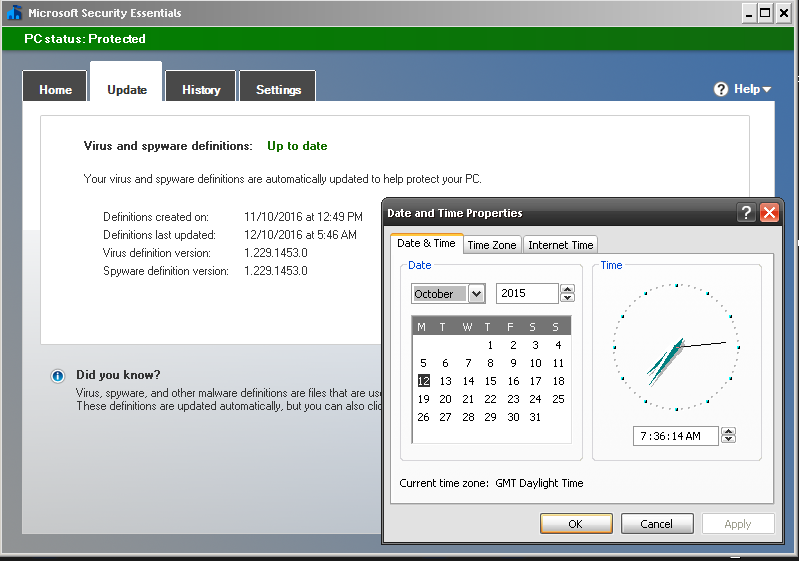
First Download the MSE update from here and then just set your windows Clock back 1 Year, then double click the Update and it'll install, MSE will go green and you can scan :)

Any other problems, go into Control Panel, Administration Tools, Services, Highlight Microsoft Security Client, hit properties set to automatic then click Start and apply.. But the  DATE is important as the 4.5.216.0 version of the APPs life cycle has Expired now folks.

MSE 0x800106ba

Latest Pattern File October 2016, System Date Set Back 2015 Scan Now Possible
REMEMBER TO SET DATE BACK AFTER SCANNING (if) YOU WISH TO USE Windows Update.. Also Remember, SOME SOFTWARE Can have problems if you run a system with an invalid date. I'm sure someone will make a random patch to fix this at some stage but we are staying LEGAL here.. so NO links in the comments to illegal stuff Thank You.

for some off reason that lads tool  "Fix MSE 1.0" wont run on SP3, says MSE not installed so i had to manually restart the service after i had dumped this code into a BAT file to do the dll's registration.

regsvr32 wuaueng.dll
regsvr32 wucltui.dll
regsvr32 softpub.dll
regsvr32 wintrust.dll
regsvr32 initpki.dll
regsvr32 wups.dll
regsvr32 wuweb.dll
regsvr32 atl.dll
regsvr32 mssip32.dll