
Windows Vista Update Support Ended Today (11th April 2017)
Files Gathered For Offline Users Doing a Restore.
To be updated....

[Channel]
Retail
[VL]
0
 |
| With the EI.CFG file in place |
 |
| It Knows the Exact version of 8.1 your Product Key is designed for |
 |
| Detects the file and within windows you can see the file |
 |
| It will then offer you these choices |
 |
| After Deleting the file i get this screen |
 |
| Now if offers the option to restore it and recheck for it |
@echo off
TITLE Windows 8.1 Version Select - Enable and Disable Script
color C
@echo off
:START
:Checking For The Product Key and Version Config File
IF NOT EXIST %CDROM%\sources\ei.cfg goto MENU2
IF EXIST %CDROM%\sources\ei.cfg goto MENU1
ECHO.
:MENU1
cls
color 47
ECHO.
ECHO.
ECHO The Product key (ei.cfg) file has been detected in sources folder.
ECHO.
ECHO With the existance of EI.CFG, Setup.exe Can't check the Bios for Embeded KEYs
ECHO EI.CFG also stops you Manually Entering your KEY Until After Setup
ECHO.
ECHO With that factor in mind (without ei.cfg) you Can let setup.exe
ECHO A - Auto Detect Machines Bios SliC Key (Jumps to architecture choice)
ECHO B - Allow You Manual Entry Of Product Key (Jumps to OS and architecture choice)
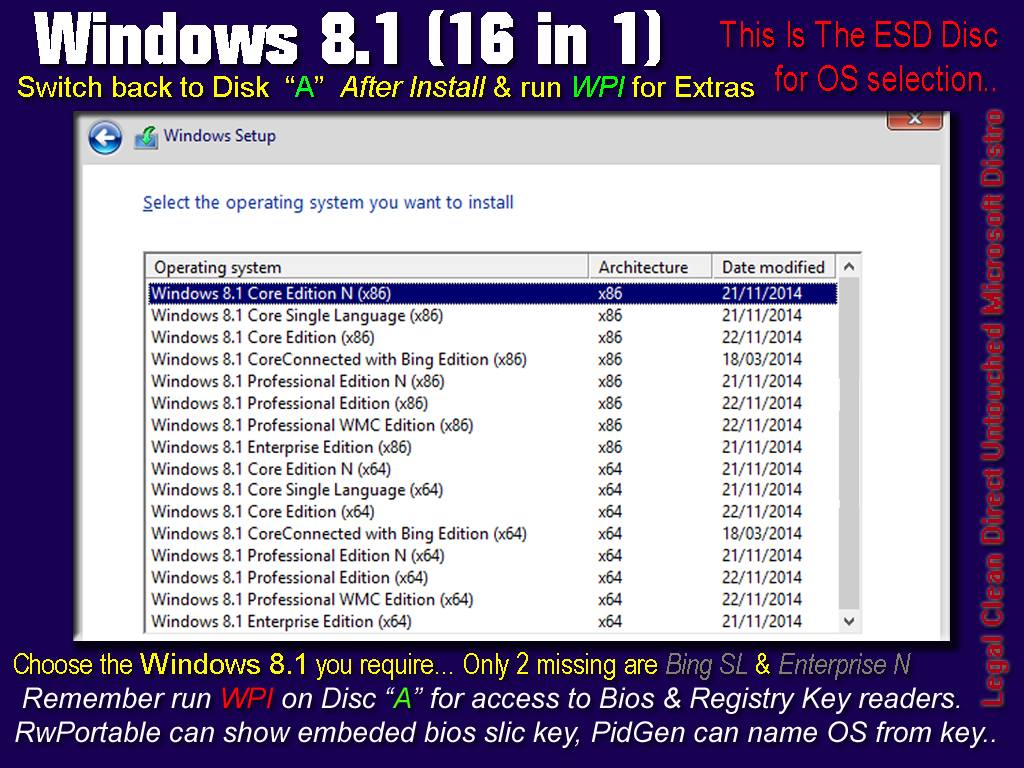
ECHO The product key, ESD and Setup auto defines which 8.1 is Valid for that key
ECHO.
ECHO If Setup accepts the Product Key you will see both x86 and x64 for the
ECHO 8.1 Release the Product Key is valid for, be it Core, CoreSL, Pro, so on..
ECHO.
ECHO This guarantees Genuine Activation on Windows 8.0 or 8.1 Hardware
ECHO Setup.exe and the install.esd are both set to identify OEM and RETAIL keys.
ECHO.
pause
cls
ECHO.
ECHO.
ECHO Do you wish to remove the EI.CFG file and have setup Auto Select an 8.1 by Key
ECHO Or go with the Manual OS Selection for later Activation on your hardware?
ECHO.
ECHO =======================================================
ECHO PRESS Number then Hit Enter to select your option
ECHO =======================================================
echo.
ECHO 1 - Remove EI.CFG and let setup attempt Key Identification (recomended)
ECHO 2 - Leave EI.CFG and Manually Select an OS (not legally recomended)
ECHO 3 - Re-Check for presence of EI.CFG
ECHO 4 - Exit and do nothing
ECHO.
SET /P M=Type 1, 2, 3 or 4 then press ENTER:
IF %M%==1 GOTO REMOVE
IF %M%==2 GOTO CLOSE
IF %M%==3 GOTO START
IF %M%==4 GOTO CLOSE
:MENU2
cls
color A0
ECHO.
ECHO.
ECHO.
ECHO The Product key (ei.cfg) file has Not Been Detected in the sources folder...
ECHO.
ECHO With the existance of EI.CFG Setup.exe does Not Check for a Product Key
ECHO So you will be asked later for one (before you can activate)
ECHO.
ECHO.
ECHO With that factor in mind, with ei.cfg present you can select any 8.1
ECHO 1 of 16 versions in x86 and x64, but be weary there are 3 versions of core
ECHO Working out the exact OS SKU for your Product Key is easier without the EI.CFG
ECHO.
pause
cls
ECHO.
ECHO.
ECHO Do you wish to restore the EI.CFG file and Manually Select an 8.1
ECHO Or go with the Key Auto Selection for Genuin Activation on your hardware?
ECHO.
ECHO =======================================================
ECHO PRESS Number then Hit Enter to select your option
ECHO =======================================================
echo.
ECHO 1 - Restore - EI.CFG file (not legally recomended)
ECHO 2 - Re-Check for presence of EI.CFG
ECHO 3 - Exit leaving Product Key check in place (recomended)
ECHO.
SET /P M=Type 1, 2, 3 then press ENTER:
IF %M%==1 GOTO RESTORE
IF %M%==2 GOTO START
IF %M%==3 GOTO CLOSE
:RESTORE
copy %CDROM%\sources\ei.bak %CDROM%\sources\ei.cfg
cls
goto START
:REMOVE
del %CDROM%\sources\ei.cfg
cls
goto START
:CLOSE
exit
 |
| I have TYPED C: then hit enter |


@ECHO OFFB) rather than making the bat file, you could add the code above to the setupcomplete.cmd
setlocal
set PATHTOFIXES=%SystemDrive%\WINDOWS_UPDATES
FOR %%i IN ("%PATHTOFIXES%\*.msu") DO START /WAIT "" WUSA.EXE "%%i" /quiet /norestart
NDP462-KB3151800-x86-x64-AllOS-ENU.exe <-- Run Manually or setupcomplete it
and then these
Windows8.1-KB2894856-v2-x64.msu
Windows8.1-KB2899189-x64.msu
Windows8.1-KB2973351-x64.msu
Windows8.1-KB2977765-x64.msu
Windows8.1-KB2978041-x64.msu
Windows8.1-KB2978126-x64.msu
Windows8.1-KB2979576-x64.msu
Windows8.1-KB2994290-x64.msu
Windows8.1-KB3004361-x64.msu
Windows8.1-KB3004365-v2-x64.msu
Windows8.1-KB3008242-x64.msu
Windows8.1-KB3011780-x64.msu
Windows8.1-KB3019215-x64.msu
Windows8.1-KB3019978-x64.msu
Windows8.1-KB3021674-x64.msu
Windows8.1-KB3021910-x64.msu
Windows8.1-KB3022777-x64.msu
Windows8.1-KB3023222-x64.msu
Windows8.1-KB3023266-x64.msu
Windows8.1-KB3025417-x64.msu
Windows8.1-KB3030377-x64.msu
Windows8.1-KB3032663-x64.msu
Windows8.1-KB3033889-x64.msu
Windows8.1-KB3035017-x64.msu
Windows8.1-KB3035126-x64.msu
Windows8.1-KB3035132-x64.msu
Windows8.1-KB3037579-x64.msu
Windows8.1-KB3038256-x64.msu
Windows8.1-KB3039066-x64.msu
Windows8.1-KB3042085-v2-x64.msu
Windows8.1-KB3042553-x64.msu
Windows8.1-KB3044374-x64.msu
Windows8.1-KB3045171-x64.msu
Windows8.1-KB3045685-x64.msu
Windows8.1-KB3045755-x64.msu
Windows8.1-KB3045999-x64.msu
Windows8.1-KB3046002-x64.msu
Windows8.1-KB3046359-x64.msu
Windows8.1-KB3055642-x64.msu
Windows8.1-KB3059317-x64.msu
Windows8.1-KB3061468-x64.msu
Windows8.1-KB3061512-x64.msu
Windows8.1-KB3061518-x64.msu
Windows8.1-KB3062760-x64.msu
Windows8.1-KB3065822-x64.msu
Windows8.1-KB3067505-x64.msu
Windows8.1-KB3069392-x64.msu
Windows8.1-KB3070102-x64.msu
Windows8.1-KB3072630-x64.msu
Windows8.1-KB3072633-x64.msu
Windows8.1-KB3074886-x64.msu
Windows8.1-KB3075516-x64.msu
Windows8.1-KB3079777-x64.msu
Windows8.1-KB3079904-x64.msu
NDP462-KB3151800-x86-x64-AllOS-ENU.exe <-- Run Manually or setupcomplete it
and then these
Windows8.1-KB2894856-v2-x86.msu
Windows8.1-KB2899189-x86.msu
Windows8.1-KB2973351-x86.msu
Windows8.1-KB2977765-x86.msu
Windows8.1-KB2978041-x86.msu
Windows8.1-KB2978126-x86.msu
Windows8.1-KB2979576-x86.msu
Windows8.1-KB2994290-x86.msu
Windows8.1-KB3004361-x86.msu
Windows8.1-KB3004365-v2-x86.msu
Windows8.1-KB3008242-x86.msu
Windows8.1-KB3011780-x86.msu
Windows8.1-KB3019215-x86.msu
Windows8.1-KB3019978-x86.msu
Windows8.1-KB3021674-x86.msu
Windows8.1-KB3021910-x86.msu
Windows8.1-KB3022777-x86.msu
Windows8.1-KB3023222-x86.msu
Windows8.1-KB3023266-x86.msu
Windows8.1-KB3025417-x86.msu
Windows8.1-KB3030377-x86.msu
Windows8.1-KB3032663-x86.msu
Windows8.1-KB3033889-x86.msu
Windows8.1-KB3035017-x86.msu
Windows8.1-KB3035126-x86.msu
Windows8.1-KB3035132-x86.msu
Windows8.1-KB3037579-x86.msu
Windows8.1-KB3038256-x86.msu
Windows8.1-KB3039066-x86.msu
Windows8.1-KB3042085-v2-x86.msu
Windows8.1-KB3042553-x86.msu
Windows8.1-KB3044374-x86.msu
Windows8.1-KB3045171-x86.msu
Windows8.1-KB3045685-x86.msu
Windows8.1-KB3045755-x86.msu
Windows8.1-KB3045999-x86.msu
Windows8.1-KB3046002-x86.msu
Windows8.1-KB3055642-x86.msu
Windows8.1-KB3059317-x86.msu
Windows8.1-KB3061468-x86.msu
Windows8.1-KB3061512-x86.msu
Windows8.1-KB3061518-x86.msu
Windows8.1-KB3062760-x86.msu
Windows8.1-KB3065822-x86.msu
Windows8.1-KB3067505-x86.msu
Windows8.1-KB3069392-x86.msu
Windows8.1-KB3070102-x86.msu
Windows8.1-KB3072630-x86.msu
Windows8.1-KB3072633-x86.msu
Windows8.1-KB3074886-x86.msu
Windows8.1-KB3075516-x86.msu
Windows8.1-KB3079777-x86.msu
Windows8.1-KB3079904-x86.msu


en_windows_xp_home_with_service_pack_3_x86_cd_x14-_OEM_.iso
en_windows_xp_home_with_service_pack_3_x86_cd_x14-92413.iso
en_windows_xp_professional_with_service_pack_3_x86_cd_x14-_OEM_.iso
en_windows_xp_professional_with_service_pack_3_x86_cd_vl_x14-73974.iso
DELL_XP_HOME_SP3_20080911.iso
DELL_XP_HOME_SP3_20090829.iso
DELL_XP_PRO_SP3_20080819.iso
DELL_XP_PRO_SP3_20090819.iso
en_windows_xp_professional_kn_with_service_pack_3_x86_cd_x14-92432.iso
en_windows_xp_professional_n_with_service_pack_3_x86_cd_vl_x14-78118.iso
en_windows_xp_professional_n_with_service_pack_3_x86_cd_x14-92445.iso
en_windows_xp_professional_k_with_service_pack_3_x86_cd_x14-92430.iso
en_windows_xp_home_kn_with_service_pack_3_x86_cd_x14-92388.iso
en_windows_xp_home_n_with_service_pack_3_x86_cd_x14-92393.iso
en_windows_xp_home_k_with_service_pack_3_x86_cd_x14-92386.iso
 |
| One Single ISO and 15 DELTA Files |
 |
| 16 ISO's from 15 Small Delta Files & One ISO with a lil exe & bat |
 |
| Once Unpacked You'll See This |
------------------------------------------------------------
This package is for Windows XP Service Pack 3
(do not use this unless you Have SP3 Installed)
------------------------------------------------------------
My pack is intended for legal use only.
Modification of these files to install illegal software is strictly forbidden
Folder 01: Capcom, RootCerts, JScript
Folder 02: Internet Explorer 6 Updates (you can skip this if installing IE 7 or IE 8)
Folder 03: Windows Critical Updates
Folder 04: Windows Optional Updates
Folder 05: Windows Media Player 9 Updates (you can skip this if installing MP10 or MP11)
Install them in order of folder number (UNLESS YOU PLAN TO INSTALL IE8)
then you might wish to install IE8 and Updates First
Then do folder 3 and 4 (then Rootcerts from folder 1) then hit the "Optional" Folder for MP11 and what ever else
Random Bat files are included for easy use, some reboot, some don't, some back up some use /nobackup
At some stage i shall be posting more detailed scripts that you your self can add to the pack or work into your own setup concepts
NOTES:
------------------------------------------
Windows XP MCE 2002 and MCE 2005 come with .NET 1.0 SP3
So it is advised to, Install the 1.0 SP3 updates Before 1.1 and 1.1 SP1
ONLY IF YOUR RUNNING MEDIA CENTER
NOTES 2:
------------------------------------------
Service Pack 3 comes with
Internet Explorer 6.0
Media Player 9.0
So that is what this pack Directly Updates
(THOUGH REMEMBER YOU CAN SKIP FOLDER 2 AND 5 AS NOTED ABOVE)
See the Optional Folder For:
------------------------------------------
MS Installer 4.5
DirectX (Complete) Just Run The 0DXSETUP.exe
Sys Internals Autoruns
Internet Explorer 7 & Updates
Internet Explorer 8 & Updates
Windows Media Player 10 & Updates
Windows Media Player 11 & Updates
TweakUI for Windows XP & VBS to Add/Remove from Cpanel Icon
TweakUI for Windows XP Media Center 2005
MS.Net 1.0 SP3 Updates (Only For MCE)
MS.Net 1.1
MS.Net 1.1 SP1 and Update
MS.Net 2.0 SP2 and Updates
MS.Net 3.5 and Updates (also supports 2.0sp2/3.0sp3 runtime)
MS.NET 4.0 and Updates
DOT_NET Removal Tool (for 1.0 to 4.0)
MS Silverlight
MS PowerShell & WinRM 2.0
MS Installer CleanUp Utility 2.5.0.1
Windows XP Resource Kit
IE8 Administration Kit (IEAK)
MS Network Monitor 3.4
MS Assessment Planning Toolkit 9.2
MS SysPrep Tools
MS VirtualCD 2.1
MS Baseline Security Analyzer 2.3
MS Easy Transfare XP to 7
MS EM Toolkit 4.1
MS EU Font Update
MS Font File Properties Extension
MS Download Manager
MS MP9 Powertoy
Vcredist C++2005 to 2013
Windows Search 4.0 A.k.A (Inc its KB963093 Update) and Search Addons
Clear type Powertoy
Copy Profile Powertoy
Deskman Powertoy
HTML Slide Show Powertoy
Image Resizer Powertoy
Magnifier Powertoy
PowerCalc Powertoy
Slideshow Powertoy
Taskswitch Powertoy
Timershot Powertoy
Win Color Powertoy
USMT 301
UPHClean
EndSupNote (KB2934207) Xp End Of Support Notification
Pidgen 1.1.3.590 (this can help you determin if your using the right XP install disk for your machines sticker key)
Last but not least
WindowsXPUpdateCleaner.bat (DON'T RUN THIS) Until you have Finished & Rebooted Twice
OTHERWISE IT MIGHT REMOVE PENDING TEMP FILES AWAITING INSTALL DURING A REBOOT
MY CLEANER SHOULD NEVER BE RUN AFTER INSTALLING ANYTHING UNLESS YOU HAVE REBOOTED AT LEAST ONCE!
Q) Windows Update Won't Load The Page ?also... Check out my XP Resource Page HERE
A) You need IE7 or IE8, XP comes with IE 6
S) Install 7 or 8, OR Tell Auto Updates To Show but not download & updates for windows should appear
But you'll need to visit Microsoft Update to view Additional stuff like media player, .NET, office updates.
Q) I have Installed Internet Explorer 7 (or 8) ?
and i get the message "Internet Explorer cannot display the webpage"
When i Visit Windows Update
A) I think thats to put people off, It's kinda random, Try "Microsoft Update" directly
S) http://www.update.microsoft.com/microsoftupdate/v6/default.aspx?ln=en-us
or this Windows Update url
http://www.update.microsoft.com/windowsupdate/v6/default.aspx?ln=en-us
Q) I have installed everything and yet Windows Update Shows Me More "Optional and OR Important Updates" why are these not in your pack ?
A) These WILL BE specifically just for your Mother Board and can cause serious issues for other people.
S) Just go Here https://catalog.update.microsoft.com/v7/site/Home.aspx
Manually Download Them KB numbers and Add them ONLY to the Optional Folder
After Extracting the Cab's you can Run the MSP files using
msiexec /p KB-NAME-HERE.msp /qn
But remember they are only for that model of machine OR software driver configuration.
Q) Trying to install Media Player 11, It Asks for Validation & Fails ?
A) Then your OS is an Illegal Version, it checks key types... DO NOT ADD WAG FIXES TO MY PACK OR PAGE!! OR LINK!!
S) As we are keeping this Pack Legal.. You’re on your own with that, or use MP10
Q) I Have Windows XP but it is Not Service Pack 3 ?
A) This packs already big. go Download Service Pack 3
S) Google, WindowsXP-KB936929-SP3-x86-ENU.exe 316MB, Digital Signature Date 14 April 2008 04:30:34
Q) Service Pack 3 Won't Install ?
A) Could be a number of reasons, older Cd Key used per say XP (no sp) or XP sp1 and only upto SP2 is available for that key
S) Activate Windows / Or Change Key, or change the Install State from Multi Processor to Free in the registry
Q) Service Pack 3 Won't install and i am activated ?
A) Right click on my computer and select Properties, if it lists No Service Pack Level, then you need SP1a before SP3 can be installed
S) Google, xpsp1a_en_x86.exe 144MB, Digital Signature Date 28 January 2003 06:49:38
NOTE:
At this point im done trying to help you get to the stage where you can use this pack, it comes as advertised, an SP3 update pack...
Q) Why do some bat files reboot at the end ?
A) Because it needs a reboot and you'd be a fool not to... ¯\(º_o)/¯
Q) Whats the best way to Install the .NET stuff?
A1) If you have XP MCE then start with 1.0 SP3 Updates folder (you can also add 1.1, 2.0 to 3.5) NOTE: 1.0 is their in mce already so it's best to atleast run the 1.0 SP3 updates.
A2) If you have Home, Pro or Corp, Start with 1.1, 1.1 SP1, 3.5 SP1 and End on 4.0 (but all are optional) 2.0 Is NOT needed if installing 3.5 SP1
S) For 3.5 you can just install 3.5 SP1 and then run 3.5SP1FULL.bat and that adds the runtime updates for the 2.0SP2 and the 3.0SP2 into 3.5 SP1.
AS NOTED, You dont need to install OR run the 2.0 or 3.0 scripts If you install 3.5 SP1.
I included the 2.0 and 3.0 scripts incase they are the .NET's you use for something and don't wish to install 3.5.
Essentially for people who are stuck with ATi Radion cards or weird software that needed .NET 2 or 3, you can update just the .NET your stuck with by using the individual script for that version.
But be aware, Once Microsoft .NET 2.0 SP2 has been installed then Microsoft .NET 3.5 SP1 A.k.A KB951847 moves from Optional to Important on microsoft update site.
Even though the included 2.0 SP2 updates apparently satisfied the 2.0 SP2 install.
Q) Were is Microsoft .NET 4.5, 4.5.1 and 4.5.2 ?
A) They did not legally ship 4.5+ for XP, the 4.5+ = Windows Vista & Upwards only.
MICROSOFT WEBSITE STATES: Supported Operating System
Windows 7 Service Pack 1, Windows 8, Windows Server 2008 R2 SP1, Windows Server 2008 Service Pack 2, Windows Server 2012, Windows Vista Service Pack 2
Doesn't note XP, even though the file (NDP451-KB2858728-x86-x64-AllOS-ENU.exe) Release date Is 12/10/2013 before the Xp 2014 cut off.
See, https://www.microsoft.com/en-gb/download/details.aspx?id=40779
The official download of 4.5 and 4.5.1 Won't legally install on Windows XP.
Q) Internet Explorer updates most current is 2017, yet support ended April 2014, How can this be?
A) Microsoft released two out of service Internet Explorer updates to users, the first on 30/APR/2014 and another on 10/APR/2017
Q) The Windows updates most current is 2017, yet support ended April 2014, How can this be?
A) Microsoft released one out of service Windows Xp update to users on 11/FEB/2017.
Q) Is this Really the FULL DirectX in this package ?
A) YES... try running the WebInst online, it'll find Nothing, my pack has it ALL..
Even that one from 2006 that downloads after certain games are installed.. my home made pack covers it ALL
Re-install after installing games...
Q) Do i need to install Internet Explorer 7 before Internet Explorer 8 ?
A) No....
Q) How can i Set Google as my Default Internet Explorer Search Engine Provider rather than having to use the home page?
A) Go to googles page here and click their button to add their search provider to Internet Explorer.
S) https://www.google.com/homepage/search/sp-ie.html
H) for histories sake the Old Url from Microsoft was
http://www.iegallery.com/en-gb/Addons/Details/813
Q) Do i need to install Windows Media Player 10 before Windows Media Player 11 ?
A) No....
Q) What happened to Windows media Player 8 Updates?
A) XP SP3 comes with Media Player 9, so why would i include updates for 8 ?
Q) I cant install Media Player 11 on MCE ?
A) It's not for MCE and IT WILL BREAK MCE components if you try doing the internal MSI files manually
The Correct WMP11 for MCE (24.5MB) was Digitally signed on the 4 January 2007 at 4:06PM (and it requires windowsxpmediacenter2005-KB925766 installing BEFORE MP11)
This pack doesn't really support MCE, though many of the folder 3 & 4 updates will work IF MCE is at SP3 level, but DO NOT USE any WMP stuff from this pack on MCE!
TweakUI is also not to be used on MCE, because MCE has its own TweakMCE software..
Q) Were is firefox, winamp, vlc, iTunes and stuff like that?
A) Behave ya self ffs.. the packs already a GB+ Visit my XP Extras Page for other stuff
S) https://pcrepairbootle.blogspot.com/p/winxp.html
N) I included Java, Acrobat reader, flash for IE and FireFox along with Shockwave and Air
Q) I love this, but how about an x64 version?
A) No, you must understand this was Fully Tested on Home, Pro & MCE.. A NUMBER OF TIMES!, boring as hell!
S) Just use a copy of this Pack as a Template. It clearly lists ALL the KB's and other stuff needed
So just hit here https://catalog.update.microsoft.com/v7/site/Home.aspx
And grab the x64 files and replace them, then check Windows Update to make sure you have them all
AND REMEMBER "if you share YOUR x64 Pack" Don't include any cracks.. OR if you feel the need to share illegal stuff
THEN REMOVE MY BAT FILES AND MY READ ME AND ANYTHING THAT LINKS TO ME!!!
Q) What about a french, german, russian version or other language?
A) again NO, Exact same answer AND solution as the question above
Q) Will you be Updating this pack?
A) I doubt it.. How can i?, this is a legal pack from SP3 up to 8th April 2014 (inc the three out of service patches)
Q) Can i torrent your pack?
A) Yes, BUT DON'T add any WAG cracks, patches, keygens or Reg files for circumventing Genuine Checks!
And DON'T unpack it before sharing...
DON'T EVER EVER TORRENT RAW EXE FILES!!! Share this AS IS.. Which is a "Protected RAR with Recovery Record"
Q) Does this pack support Windows Fundamentals for Legacy PC's ?
A) Thats hit or miss, to begin with WINFLP is XP Service Pack 2 (and its SP3 update isn't even the same as the normal SP3)
S) For WINFLP you'd need to install KB958255 (which is the correct sp3 for winflp) You'd also find KB4018271 isn't compatible and also KB2686509 "on winflp" actually uses an Embedded update not a normal one like your typical Xp, why i have no idea.
It also has less updates required than a normal XP, because WINFLP lacks varied XP features / services.
Frankly it would be a real bad idea to use this pack on WINFLP because it might add services that are not complete..
Q) Will you be making an actual WINFLP pack like this one?
A) Maybe, i'm not sure yet, but i defo wouldn't use this pack on it.
S) Keep an eye on my blog i guess, you can follow the blog if you have a youtube login before you visit my page.
Q) The year is 2097 and When i visit your blog, it says Warning Invalid Certificate?
A) Googles Blogger changed from allowing OPTIONAL HTTP connections to enforced HTTPS connections back in 2016 (and XP stopped Root Certificate Updates in 2014)
S) Computers are thick, unless you tell them its ok then its seen as not ok, and xp hasn't been told about certificates since November 2013!
Just ignore it and click proceed, or use a newer browser, it's a real "Google Blog" you can trust it...
@TITLE TheWraith Windows XP SP3 Important Updates Installer
COLOR 1f
@echo off
setlocal
cls
:SPLEVELTESTING
if exist %SystemRoot%\System32\CatRoot\{F750E6C3-38EE-11D1-85E5-00C04FC295EE}\SP3.CAT goto :SP_OK
if exist %SystemRoot%\System32\CatRoot\{F750E6C3-38EE-11D1-85E5-00C04FC295EE}\SP1.CAT goto :SP1DETECTED
if exist %SystemRoot%\System32\CatRoot\{F750E6C3-38EE-11D1-85E5-00C04FC295EE}\SP2.CAT goto :SP2DETECTED
if not exist %SystemRoot%\System32\CatRoot\{F750E6C3-38EE-11D1-85E5-00C04FC295EE}\SP3.CAT goto :SP3MISSING
:SP_OK
echo.
@echo ================================================
@echo [ TheWraith Windows XP SP3 Update Installer ]
@echo [ (c) http://www.pcrepairbootle.blogspot.co.uk ]
@echo ================================================
echo.
ECHO This Will Install ALL The Legal XP Updates for SP3
ECHO For Windows XP Home Pro
echo.
ECHo NOTE...
ECHO Does create the BACK UP folders in the WIN Dir
echo.
ECHO This is a fully legal collection
ECHO NO POSREADY UPDATES ARE INCLUDED
echo.
ECHO (Updates covering SP3 UPTO 8th April 2014)
ECHO INC's OUT OF SERVICE FEB 2017 UPDATE
echo.
:CONFIRMUPDATE
@ECHO OFF
echo.
set /P c= Do You Want To Install Updates Now..[Y/N]?
echo
if /I "%c%" EQU "Y" goto :INSTALL
if /I "%c%" EQU "N" goto :EXIT
goto :CONFIRMUPDATE
:EXIT
exit
:INSTALL
CLS
echo.
COLOR 4f
echo.
@echo ==============================================================
ECHO Installing (KB898461) Digital Signature 17 May 2005
ECHO This Update Installs A Permanent Copy Of The Package Installer
@echo ==============================================================
start /wait WindowsXP-KB898461-x86-ENU.exe /quiet /norestart
ECHO Done!
REM for debugging
echo.
@echo ==============================================================
ECHO Installing (KB923789) Digital Signature 19 October 2006
@echo ==============================================================
ECHO This is the update for the flash.ocx file within native IE6
start /wait WindowsXP-KB923789-x86-ENU.exe /Q
ECHO Done!
REM for debugging
echo.
@echo ==============================================================
ECHO Installing (KB952287) Digital Signature 1 May 2008
@echo ==============================================================
start /wait WindowsXP-KB952287-x86-ENU.exe /quiet /norestart
ECHO Done!
REM for debugging
echo.
@echo ==============================================================
ECHO Installing (KB946648) Digital Signature 2 May 2008
@echo ==============================================================
start /wait WindowsXP-KB946648-x86-ENU.exe /quiet /norestart
ECHO Done!
REM for debugging
echo.
@echo ==============================================================
ECHO Installing (KB950762) Digital Signature 8 May 2008
@echo ==============================================================
start /wait WindowsXP-KB950762-x86-ENU.exe /quiet /norestart
ECHO Done!
REM for debugging
echo.
@echo ==============================================================
ECHO Installing (KB942288-v3) Digital Signature 22 May 2008
@echo ==============================================================
start /wait WindowsXP-KB942288-v3-x86-ENU.exe /quiet /norestart
ECHO Done!
REM for debugging
echo.
@echo ==============================================================
ECHO Installing (KB952004) Digital Signature 13 June 2008
@echo ==============================================================
start /wait WindowsXP-KB952004-x86-ENU.exe /quiet /norestart
ECHO Done!
REM for debugging
echo.
@echo ==============================================================
ECHO Installing (KB951376-v2) Digital Signature 16 June 2008
@echo ==============================================================
start /wait WindowsXP-KB951376-v2-x86-ENU.exe /quiet /norestart
ECHO Done!
REM for debugging
echo.
@echo ==============================================================
ECHO Installing (KB951978) Digital Signature 19 June 2008
@echo ==============================================================
start /wait WindowsXP-KB951978-x86-ENU.exe /quiet /norestart
ECHO Done!
REM for debugging
echo.
@echo ==============================================================
ECHO Installing (KB950974) Digital Signature 7 July 2008
@echo ==============================================================
start /wait WindowsXP-KB950974-x86-ENU.exe /quiet /norestart
ECHO Done!
REM for debugging
echo.
@echo ==============================================================
ECHO Installing (KB952954) Digital Signature 24 June 2008
@echo ==============================================================
start /wait WindowsXP-KB952954-x86-ENU.exe /quiet /norestart
ECHO Done!
REM for debugging
echo.
@echo ==============================================================
ECHO Installing (KB953155) Digital Signature 28 August 2008
@echo ==============================================================
start /wait WindowsXP-KB953155-x86-ENU.exe /quiet /norestart
ECHO Done!
REM for debugging
echo.
@echo ==============================================================
ECHO Installing (KB956572) Digital Signature 6 March 2009
@echo ==============================================================
start /wait WindowsXP-KB956572-x86-ENU.exe /quiet /norestart
ECHO Done!
REM for debugging
echo.
@echo ==============================================================
ECHO Installing (KB970483) Digital Signature 21 May 2009
@echo ==============================================================
start /wait WindowsXP-KB970483-x86-ENU.exe /quiet /norestart
ECHO Done!
REM for debugging
echo.
@echo ==============================================================
ECHO Installing (KB971657) Digital Signature 10 June 2009
@echo ==============================================================
start /wait WindowsXP-KB971657-x86-ENU.exe /quiet /norestart
ECHO Done!
REM for debugging
echo.
@echo ==============================================================
ECHO Installing (KB956844) Digital Signature 23 June 2009
@echo ==============================================================
start /wait WindowsXP-KB956844-x86-ENU.exe /quiet /norestart
ECHO Done!
REM for debugging
echo.
@echo ==============================================================
ECHO Installing (KB960859) Digital Signature 1 July 2009
@echo ==============================================================
start /wait WindowsXP-KB960859-x86-ENU.exe /quiet /norestart
ECHO Done!
REM for debugging
echo.
@echo ==============================================================
ECHO Installing (KB968389) Digital Signature 2 July 2009
@echo ==============================================================
start /wait WindowsXP-KB968389-x86-ENU.exe /quiet /norestart
ECHO Done!
REM for debugging
echo.
@echo ==============================================================
ECHO Installing (KB969059) Digital Signature 17 July 2009
@echo ==============================================================
start /wait WindowsXP-KB969059-x86-ENU.exe /quiet /norestart
ECHO Done!
REM for debugging
echo.
@echo ==============================================================
ECHO Installing (KB973507) Digital Signature 18 July 2009
@echo ==============================================================
start /wait WindowsXP-KB973507-x86-ENU.exe /quiet /norestart
ECHO Done!
REM for debugging
echo.
@echo ==============================================================
ECHO Installing (KB973869) Digital Signature 28 July 2009
@echo ==============================================================
start /wait WindowsXP-KB973869-x86-ENU.exe /quiet /norestart
ECHO Done!
REM for debugging
echo.
@echo ==============================================================
ECHO Installing (KBKB973815) Digital Signature 5 August 2009
@echo ==============================================================
start /wait WindowsXP-KB973815-x86-ENU.exe /quiet /norestart
ECHO Done!
REM for debugging
echo.
@echo ==============================================================
ECHO Installing (KB974112) Digital Signature 26 August 2009
@echo ==============================================================
start /wait WindowsXP-KB974112-x86-ENU.exe /quiet /norestart
ECHO Done!
REM for debugging
echo.
@echo ==============================================================
ECHO Installing (KB975025) Digital Signature 1 September 2009
@echo ==============================================================
start /wait WindowsXP-KB975025-x86-ENU.exe /quiet /norestart
ECHO Done!
REM for debugging
echo.
@echo ==============================================================
ECHO Installing (KB974571) Digital Signature 4 September 2009
@echo ==============================================================
start /wait WindowsXP-KB974571-x86-ENU.exe /quiet /norestart
ECHO Done!
REM for debugging
echo.
@echo ==============================================================
ECHO Installing (KB975254) Digital Signature 6 September 2009
@echo ==============================================================
start /wait WindowsXP-KB975254-x86-ENU.exe /quiet /norestart
ECHO Done!
REM for debugging
echo.
@echo ==============================================================
ECHO Installing (KB975467) Digital Signature 11 September 2009
@echo ==============================================================
start /wait WindowsXP-KB975467-x86-ENU.exe /quiet /norestart
ECHO Done!
REM for debugging
echo.
@echo ==============================================================
ECHO Installing (KBKB974318) Digital Signature 12 October 2009
@echo ==============================================================
start /wait WindowsXP-KB974318-x86-ENU.exe /quiet /norestart
ECHO Done!
REM for debugging
echo.
@echo ==============================================================
ECHO Installing (KB974392) Digital Signature 13 October 2009
@echo ==============================================================
start /wait WindowsXP-KB974392-x86-ENU.exe /quiet /norestart
ECHO Done!
REM for debugging
echo.
@echo ==============================================================
ECHO Installing (KB972270) Digital Signature 15 October 2009
@echo ==============================================================
start /wait WindowsXP-KB972270-x86-ENU.exe /quiet /norestart
ECHO Done!
REM for debugging
echo.
@echo ==============================================================
ECHO Installing (KB970430) Digital Signature 21 October 2009
@echo ==============================================================
start /wait WindowsXP-KB970430-x86-ENU.exe /quiet /norestart
ECHO Done!
REM for debugging
echo.
@echo ==============================================================
ECHO Installing (KB973904) Digital Signature 21 November 2009
@echo ==============================================================
start /wait WindowsXP-KB973904-x86-ENU.exe /quiet /norestart
ECHO Done!
REM for debugging
echo.
@echo ==============================================================
ECHO Installing (KB975560) Digital Signature 27 November 2009
@echo ==============================================================
start /wait WindowsXP-KB975560-x86-ENU.exe /quiet /norestart
ECHO Done!
REM for debugging
echo.
@echo ==============================================================
ECHO Installing (KB977914) Digital Signature 27 November 2009
@echo ==============================================================
start /wait WindowsXP-KB977914-x86-ENU.exe /quiet /norestart
ECHO Done!
REM for debugging
echo.
@echo ==============================================================
ECHO Installing (KB975713) Digital Signature 8 December 2009
@echo ==============================================================
start /wait WindowsXP-KB975713-x86-ENU.exe /quiet /norestart
ECHO Done!
REM for debugging
echo.
@echo ==============================================================
ECHO Installing (KB978706) Digital Signature 17 December 2009
@echo ==============================================================
start /wait WindowsXP-KB978706-x86-ENU.exe /quiet /norestart
ECHO Done!
REM for debugging
echo.
@echo ==============================================================
ECHO Installing (KB979309) Digital Signature 13 January 2010
@echo ==============================================================
start /wait WindowsXP-KB979309-x86-ENU.exe /quiet /norestart
ECHO Done!
REM for debugging
echo.
@echo ==============================================================
ECHO Installing (KB977816) Digital Signature 29 January 2010
@echo ==============================================================
start /wait WindowsXP-KB977816-x86-ENU.exe /quiet /norestart
ECHO Done!
REM for debugging
echo.
@echo ==============================================================
ECHO Installing (KB978542) Digital Signature 1 February 2010
@echo ==============================================================
start /wait WindowsXP-KB978542-x86-ENU.exe /quiet /norestart
ECHO Done!
REM for debugging
echo.
@echo ==============================================================
ECHO Installing (KB978338) Digital Signature 12 February 2010
@echo ==============================================================
start /wait WindowsXP-KB978338-x86-ENU.exe /quiet /norestart
ECHO Done!
REM for debugging
echo.
@echo ==============================================================
ECHO Installing (KB979482) Digital Signature 5 March 2010
@echo ==============================================================
start /wait WindowsXP-KB979482-x86-ENU.exe /quiet /norestart
ECHO Done!
REM for debugging
echo.
@echo ==============================================================
ECHO Installing (KB976323) Digital Signature 5 March 2010
@echo ==============================================================
start /wait WindowsXP-KB976323-x86-ENU.exe /quiet /norestart
ECHO Done!
REM for debugging
echo.
@echo ==============================================================
ECHO Installing (KB2229593) Digital Signature 15 June 2010
@echo ==============================================================
start /wait WindowsXP-KB2229593-x86-ENU.exe /quiet /norestart
ECHO Done!
REM for debugging
echo.
@echo ==============================================================
ECHO Installing (KB2115168) Digital Signature 15 June 2010
@echo ==============================================================
start /wait WindowsXP-KB2115168-x86-ENU.exe /quiet /norestart
ECHO Done!
REM for debugging
echo.
@echo ==============================================================
ECHO Installing (KB982665) Digital Signature 17 June 2010
@echo ==============================================================
start /wait WindowsXP-KB982665-x86-ENU.exe /quiet /norestart
ECHO Done!
REM for debugging
echo.
@echo ==============================================================
ECHO Installing (KB981997) Digital Signature 21 June 2010
@echo ==============================================================
start /wait WindowsXP-KB981997-x86-ENU.exe /quiet /norestart
ECHO Done!
REM for debugging
echo.
@echo ==============================================================
ECHO Installing (KB2124261) Digital Signature 7 July 2010
@echo ==============================================================
start /wait WindowsXP-KB2124261-x86-ENU.exe /quiet /norestart
ECHO Done!
REM for debugging
echo.
@echo ==============================================================
ECHO Installing (KB979687) Digital Signature 16 July 2010
@echo ==============================================================
start /wait WindowsXP-KB979687-x86-ENU.exe /quiet /norestart
ECHO Done!
REM for debugging
echo.
@echo ==============================================================
ECHO Installing (KB2290570) Digital Signature 27 July 2010
@echo ==============================================================
start /wait WindowsXP-KB2290570-x86-ENU.exe /quiet /norestart
ECHO Done!
REM for debugging
echo.
@echo ==============================================================
ECHO Installing (KB2347290) Digital Signature 17 August 2010
@echo ==============================================================
start /wait WindowsXP-KB2347290-x86-ENU.exe /quiet /norestart
ECHO Done!
REM for debugging
echo.
@echo ==============================================================
ECHO Installing (KB2296011) Digital Signature 23 August 2010
@echo ==============================================================
start /wait WindowsXP-KB2296011-x86-ENU.exe /quiet /norestart
ECHO Done!
REM for debugging
echo.
@echo ==============================================================
ECHO Installing (KB982132) Digital Signature 27 August 2010
@echo ==============================================================
start /wait WindowsXP-KB982132-x86-ENU.exe /quiet /norestart
ECHO Done!
REM for debugging
echo.
@echo ==============================================================
ECHO Installing (KB2345886) Digital Signature 7 September 2010
@echo ==============================================================
start /wait WindowsXP-KB2345886-x86-ENU.exe /quiet /norestart
ECHO Done!
REM for debugging
echo.
@echo ==============================================================
ECHO Installing (KB2387149) Digital Signature 18 September 2010
@echo ==============================================================
start /wait WindowsXP-KB2387149-x86-ENU.exe /quiet /norestart
ECHO Done!
REM for debugging
echo.
@echo ==============================================================
ECHO Installing (KB2423089) Digital Signature 20 October 2010
@echo ==============================================================
start /wait WindowsXP-KB2423089-x86-ENU.exe /quiet /norestart
ECHO Done!
REM for debugging
echo.
@echo ==============================================================
ECHO Installing (KB2419632) Digital Signature 09 November 2010
@echo ==============================================================
start /wait WindowsXP-KB2419632-x86-ENU.exe /quiet /norestart
ECHO Done!
REM for debugging
echo.
@echo ==============================================================
ECHO Installing (KB2443105) Digital Signature 19 November 2010
@echo ==============================================================
start /wait WindowsXP-KB2443105-x86-ENU.exe /quiet /norestart
ECHO Done!
REM for debugging
echo.
@echo ==============================================================
ECHO Installing (KB2393802) Digital Signature 10 December 2010
@echo ==============================================================
start /wait WindowsXP-KB2393802-x86-ENU.exe /quiet /norestart
ECHO Done!
REM for debugging
echo.
@echo ==============================================================
ECHO Installing (KB2478960) Digital Signature 20 December 2010
@echo ==============================================================
start /wait WindowsXP-KB2478960-x86-ENU.exe /quiet /norestart
ECHO Done!
REM for debugging
echo.
@echo ==============================================================
ECHO Installing (KB2485663) Digital Signature 21 December 2010
@echo ==============================================================
start /wait WindowsXP-KB2485663-x86-ENU.exe /quiet /norestart
ECHO Done!
REM for debugging
echo.
@echo ==============================================================
ECHO Installing (KB2478971) Digital Signature 22 December 2010
@echo ==============================================================
start /wait WindowsXP-KB2478971-x86-ENU.exe /quiet /norestart
ECHO Done!
REM for debugging
echo.
@echo ==============================================================
ECHO Installing (KB2483185) Digital Signature 21 January 2011
@echo ==============================================================
start /wait WindowsXP-KB2483185-x86-ENU.exe /quiet /norestart
ECHO Done!
REM for debugging
echo.
@echo ==============================================================
ECHO Installing (KB2481109) Digital Signature 2 February 2011
@echo ==============================================================
start /wait WindowsXP-KB2481109-x86-ENU.exe /quiet /norestart
ECHO Done!
REM for debugging
echo.
@echo ==============================================================
ECHO Installing (KB2506212) Digital Signature 8 February 2011
@echo ==============================================================
start /wait WindowsXP-KB2506212-x86-ENU.exe /quiet /norestart
ECHO Done!
REM for debugging
echo.
@echo ==============================================================
ECHO Installing (KB2479943) Digital Signature 9 February 2011
@echo ==============================================================
start /wait WindowsXP-KB2479943-x86-ENU.exe /quiet /norestart
ECHO Done!
REM for debugging
echo.
@echo ==============================================================
ECHO Installing (KB2491683) Digital Signature 11 February 2011
@echo ==============================================================
start /wait WindowsXP-KB2491683-x86-ENU.exe /quiet /norestart
ECHO Done!
REM for debugging
echo.
@echo ==============================================================
ECHO Installing (KB2508429) Digital Signature 18 February 2011
@echo ==============================================================
start /wait WindowsXP-KB2508429-x86-ENU.exe /quiet /norestart
ECHO Done!
REM for debugging
echo.
@echo ==============================================================
ECHO Installing (KB2509553) Digital Signature 3 March 2011
@echo ==============================================================
start /wait WindowsXP-KB2509553-x86-ENU.exe /quiet /norestart
ECHO Done!
REM for debugging
echo.
@echo ==============================================================
ECHO Installing (KB2510581) Digital Signature 4 March 2011
@echo ==============================================================
start /wait WindowsXP-KB2510581-x86-ENU.exe /quiet /norestart
ECHO Done!
REM for debugging
echo.
@echo ==============================================================
ECHO Installing (KB2492386) Digital Signature 11 March 2011
@echo ==============================================================
start /wait WindowsXP-KB2492386-x86-ENU.exe /quiet /norestart
ECHO Done!
REM for debugging
echo.
@echo ==============================================================
ECHO Installing (KB2535512) Digital Signature 21 April 2011
@echo ==============================================================
start /wait WindowsXP-KB2535512-x86-ENU.exe /quiet /norestart
ECHO Done!
REM for debugging
echo.
@echo ==============================================================
ECHO Installing (KB2566454) Digital Signature 8 July 2011
@echo ==============================================================
start /wait WindowsXP-KB2566454-x86-ENU.exe /quiet /norestart
ECHO Done!
REM for debugging
echo.
@echo ==============================================================
ECHO Installing (KB2536276-v2) Digital Signature 15 July 2011
@echo ==============================================================
start /wait WindowsXP-KB2536276-v2-x86-ENU.exe /quiet /norestart
ECHO Done!
REM for debugging
echo.
@echo ==============================================================
ECHO Installing (KB2570947) Digital Signature 2 August 2011
@echo ==============================================================
start /wait WindowsXP-KB2570947-x86-ENU.exe /quiet /norestart
ECHO Done!
REM for debugging
echo.
@echo ==============================================================
ECHO Installing (KB2592799) Digital Signature 18 August 2011
@echo ==============================================================
start /wait WindowsXP-KB2592799-x86-ENU.exe /quiet /norestart
ECHO Done!
REM for debugging
echo.
@echo ==============================================================
ECHO Installing (KB2564958) Digital Signature 26 September 2011
@echo ==============================================================
start /wait WindowsXP-KB2564958-x86-ENU.exe /quiet /norestart
ECHO Done!
REM for debugging
echo.
@echo ==============================================================
ECHO Installing (KB2544893-v2) Digital Signature 10 October 2011
@echo ==============================================================
start /wait WindowsXP-KB2544893-v2-x86-ENU.exe /quiet /norestart
ECHO Done!
REM for debugging
echo.
@echo ==============================================================
ECHO Installing (KB2598479) Digital Signature 14 October 2011
@echo ==============================================================
start /wait WindowsXP-KB2598479-x86-ENU.exe /quiet /norestart
ECHO Done!
REM for debugging
echo.
@echo ==============================================================
ECHO Installing (KB2619339) Digital Signature 18 October 2011
@echo ==============================================================
start /wait WindowsXP-KB2619339-x86-ENU.exe /quiet /norestart
ECHO Done!
REM for debugging
echo.
@echo ==============================================================
ECHO Installing (KB2620712) Digital Signature 28 October 2011
@echo ==============================================================
start /wait WindowsXP-KB2620712-x86-ENU.exe /quiet /norestart
ECHO Done!
REM for debugging
echo.
@echo ==============================================================
ECHO Installing (KB2631813) Digital Signature 3 November 2011
@echo ==============================================================
start /wait WindowsXP-KB2631813-x86-ENU.exe /quiet /norestart
ECHO Done!
REM for debugging
echo.
@echo ==============================================================
ECHO Installing (KB2603381) Digital Signature 3 November 2011
@echo ==============================================================
start /wait WindowsXP-KB2603381-x86-ENU.exe /quiet /norestart
ECHO Done!
REM for debugging
echo.
@echo ==============================================================
ECHO Installing (KB2585542) Digital Signature 16 November 2011
@echo ==============================================================
start /wait WindowsXP-KB2585542-x86-ENU.exe /quiet /norestart
ECHO Done!
REM for debugging
echo.
@echo ==============================================================
ECHO Installing (KB2584146) Digital Signature 20 November 2011
@echo ==============================================================
start /wait WindowsXP-KB2584146-x86-ENU.exe /quiet /norestart
ECHO Done!
REM for debugging
echo.
@echo ==============================================================
ECHO Installing (KB2661637) Digital Signature 11 January 2012
@echo ==============================================================
start /wait WindowsXP-KB2661637-x86-ENU.exe /quiet /norestart
ECHO Done!
REM for debugging
echo.
@echo ==============================================================
ECHO Installing (KB2659262) Digital Signature 9 February 2012
@echo ==============================================================
start /wait WindowsXP-KB2659262-x86-ENU.exe /quiet /norestart
ECHO Done!
REM for debugging
echo.
@echo ==============================================================
ECHO Installing (KB2686509) Digital Signature 19 April 2012
@echo ==============================================================
start /wait WindowsXP-KB2686509-x86-ENU.exe /quiet /norestart
ECHO Done!
REM for debugging
echo.
@echo ==============================================================
ECHO Installing (KB2712808) Digital Signature 14 May 2012
@echo ==============================================================
start /wait WindowsXP-KB2712808-x86-ENU.exe /quiet /norestart
ECHO Done!
REM for debugging
echo.
@echo ==============================================================
ECHO Installing (KB2698365) Digital Signature 28 May 2012
@echo ==============================================================
start /wait WindowsXP-KB2698365-x86-ENU.exe /quiet /norestart
ECHO Done!
REM for debugging
echo.
@echo ==============================================================
ECHO Installing (KB2655992) Digital Signature 4 June 2012
@echo ==============================================================
start /wait WindowsXP-KB2655992-x86-ENU.exe /quiet /norestart
ECHO Done!
REM for debugging
echo.
@echo ==============================================================
ECHO Installing (KB2691442) Digital Signature 8 June 2012
@echo ==============================================================
start /wait WindowsXP-KB2691442-x86-ENU.exe /quiet /norestart
ECHO Done!
REM for debugging
echo.
@echo ==============================================================
ECHO Installing (KB2723135-v2) Digital Signature 12 September 2012
@echo ==============================================================
start /wait WindowsXP-KB2723135-v2-x86-ENU.exe /quiet /norestart
ECHO Done!
REM for debugging
echo.
@echo ==============================================================
ECHO Installing (KB2705219-v2) Digital Signature 12 September 2012
@echo ==============================================================
start /wait WindowsXP-KB2705219-v2-x86-ENU.exe /quiet /norestart
ECHO Done!
REM for debugging
echo.
@echo ==============================================================
ECHO Installing (KB2749655) Digital Signature 24 August 2012
@echo ==============================================================
start /wait WindowsXP-KB2749655-x86-ENU.exe /quiet /norestart
ECHO Done!
REM for debugging
echo.
@echo ==============================================================
ECHO Installing (KB2727528) Digital Signature 2 October 2012
@echo ==============================================================
start /wait WindowsXP-KB2727528-x86-ENU.exe /quiet /norestart
ECHO Done!
REM for debugging
echo.
@echo ==============================================================
ECHO Installing (KB2770660) Digital Signature 2 November 2012
@echo ==============================================================
start /wait WindowsXP-KB2770660-x86-ENU.exe /quiet /norestart
ECHO Done!
REM for debugging
echo.
@echo ==============================================================
ECHO Installing (KB2757638) Digital Signature 6 November 2012
@echo ==============================================================
start /wait WindowsXP-KB2757638-x86-ENU.exe /quiet /norestart
ECHO Done!
REM for debugging
echo.
@echo ==============================================================
ECHO Installing (KB2780091) Digital Signature 2 January 2013
@echo ==============================================================
start /wait WindowsXP-KB2780091-x86-ENU.exe /quiet /norestart
ECHO Done!
REM for debugging
echo.
@echo ==============================================================
ECHO Installing (KB2802968) Digital Signature 26 January 2013
@echo ==============================================================
start /wait WindowsXP-KB2802968-x86-ENU.exe /quiet /norestart
ECHO Done!
REM for debugging
echo.
@echo ==============================================================
ECHO Installing (KB2807986) Digital Signature 12 February 2013
@echo ==============================================================
start /wait WindowsXP-KB2807986-x86-ENU.exe /quiet /norestart
ECHO Done!
REM for debugging
echo.
@echo ==============================================================
ECHO Installing (KB2813345) Digital Signature 27 February 2013
@echo ==============================================================
start /wait WindowsXP-KB2813345-x86-ENU.exe /quiet /norestart
ECHO Done!
REM for debugging
echo.
@echo ==============================================================
ECHO Installing (KB2820917) Digital Signature 8 March 2013
@echo ==============================================================
start /wait WindowsXP-KB2820917-x86-ENU.exe /quiet /norestart
ECHO Done!
REM for debugging
echo.
@echo ==============================================================
ECHO Installing (KB2808679) Digital Signature 10 April 2013
@echo ==============================================================
start /wait WindowsXP-KB2808679-x86-ENU.exe /quiet /norestart
ECHO Done!
REM for debugging
echo.
@echo ==============================================================
ECHO Installing (KB2834886) Digital Signature 10 April 2013
@echo ==============================================================
start /wait WindowsXP-KB2834886-x86-ENU.exe /quiet /norestart
ECHO Done!
REM for debugging
echo.
@echo ==============================================================
ECHO Installing (KB2847311) Digital Signature 4 June 2013
@echo ==============================================================
start /wait WindowsXP-KB2847311-x86-ENU.exe /quiet /norestart
ECHO Done!
REM for debugging
echo.
@echo ==============================================================
ECHO Installing (KB2859537) Digital Signature 4 July 2013
@echo ==============================================================
start /wait WindowsXP-KB2859537-x86-ENU.exe /quiet /norestart
ECHO Done!
REM for debugging
echo.
@echo ==============================================================
ECHO Installing (KB2850869) Digital Signature 10 July 2013
@echo ==============================================================
start /wait WindowsXP-KB2850869-x86-ENU.exe /quiet /norestart
ECHO Done!
REM for debugging
echo.
@echo ==============================================================
ECHO Installing (KB2868038) Digital Signature 17 July 2013
@echo ==============================================================
start /wait WindowsXP-KB2868038-x86-ENU.exe /quiet /norestart
ECHO Done!
REM for debugging
echo.
@echo ==============================================================
ECHO Installing (KB2876217) Digital Signature 5 August 2013
@echo ==============================================================
start /wait WindowsXP-KB2876217-x86-ENU.exe /quiet /norestart
ECHO Done!
REM for debugging
echo.
@echo ==============================================================
ECHO Installing (KB2862335) Digital Signature 06 August 2013
@echo ==============================================================
start /wait WindowsXP-KB2862335-x86-ENU.exe /quiet /norestart
ECHO Done!
REM for debugging
echo.
@echo ==============================================================
ECHO Installing (KB2864063) Digital Signature 9 August 2013
@echo ==============================================================
start /wait WindowsXP-KB2864063-x86-ENU.exe /quiet /norestart
ECHO Done!
REM for debugging
echo.
@echo ==============================================================
ECHO Installing (KB2862330) Digital Signature 13 August 2013
@echo ==============================================================
start /wait WindowsXP-KB2862330-x86-ENU.exe /quiet /norestart
ECHO Done!
REM for debugging
echo.
@echo ==============================================================
ECHO Installing (KB2884256) Digital Signature 29 August 2013
@echo ==============================================================
start /wait WindowsXP-KB2884256-x86-ENU.exe /quiet /norestart
ECHO Done!
REM for debugging
echo.
@echo ==============================================================
ECHO Installing (KB2879017) Digital Signature 23 September 2013
@echo ==============================================================
start /wait WindowsXP-KB2879017-x86-ENU.exe /quiet /norestart
ECHO Done!
REM for debugging
echo.
@echo ==============================================================
ECHO Installing (KB2868626) Digital Signature 7 October 2013
@echo ==============================================================
start /wait WindowsXP-KB2868626-x86-ENU.exe /quiet /norestart
ECHO Done!
REM for debugging
echo.
@echo ==============================================================
ECHO Installing (KB2876331) Digital Signature 9 October 2013
@echo ==============================================================
start /wait WindowsXP-KB2876331-x86-ENU.exe /quiet /norestart
ECHO Done!
REM for debugging
echo.
@echo ==============================================================
ECHO Installing (KB2892075) Digital Signature 24 October 2013
@echo ==============================================================
start /wait WindowsXP-KB2892075-x86-ENU.exe /quiet /norestart
ECHO Done!
REM for debugging
echo.
@echo ==============================================================
ECHO Installing (KB2900986) Digital Signature 2 November 2013
@echo ==============================================================
start /wait WindowsXP-KB2900986-x86-ENU.exe /quiet /norestart
ECHO Done!
REM for debugging
echo.
@echo ==============================================================
ECHO Installing (KB2898715) Digital Signature 7 November 2013
@echo ==============================================================
start /wait WindowsXP-KB2898715-x86-ENU.exe /quiet /norestart
ECHO Done!
REM for debugging
echo.
@echo ==============================================================
ECHO Installing (KB2893294) Digital Signature 13 November 2013
@echo ==============================================================
start /wait WindowsXP-KB2893294-x86-ENU.exe /quiet /norestart
ECHO Done!
REM for debugging
echo.
@echo ==============================================================
ECHO Installing (KB2914368) Digital Signature 27 November 2013
@echo ==============================================================
start /wait WindowsXP-KB2914368-x86-ENU.exe /quiet /norestart
ECHO Done!
REM for debugging
echo.
@echo ==============================================================
ECHO Installing (KB2916036) Digital Signature 5 December 2013
@echo ==============================================================
start /wait WindowsXP-KB2916036-x86-ENU.exe /quiet /norestart
ECHO Done!
REM for debugging
echo.
@echo ==============================================================
ECHO Installing (KB2862152) Digital Signature 12 October 2013
@echo ==============================================================
start /wait WindowsXP-KB2862152-x86-ENU.exe /quiet /norestart
ECHO Done!
REM for debugging
echo.
@echo ==============================================================
ECHO Installing (KB2909212) Digital Signature 31 December 2013
@echo ==============================================================
start /wait WindowsXP-KB2909212-x86-ENU.exe /quiet /norestart
ECHO Done!
REM for debugging
echo.
@echo ========================================================================
ECHO Installing (KB2922717) Digital Signature 21 January 2014
@echo ========================================================================
ECHO Time Zone Update
start /wait WindowsXP-KB2922717-x86-ENU.exe /quiet /norestart
ECHO Done!
REM for debugging
echo.
@echo ==============================================================
ECHO Installing (KB2929961) Digital Signature 5 February 2014
@echo ==============================================================
start /wait WindowsXP-KB2929961-x86-ENU.exe /quiet /norestart
ECHO Done!
REM for debugging
echo.
@echo ==============================================================
ECHO Installing (KB2930275) Digital Signature 7 February 2014
@echo ==============================================================
start /wait WindowsXP-KB2930275-x86-ENU.exe /quiet /norestart
ECHO Done!
REM for debugging
echo.
@echo ==============================================================
ECHO Installing (KB2922229) Digital Signature 12 March 2014
@echo ==============================================================
start /wait WindowsXP-KB2922229-x86-ENU.exe /quiet /norestart
ECHO Done!
REM for debugging
echo.
@echo ==============================================================
ECHO Installing (KB4012598) Digital Signature 11 February 2017
@echo ==============================================================
start /wait WindowsXP-KB4012598-x86-ENU.exe /quiet /norestart
ECHO Done!
REM for debugging
ECHO WILL REBOOT SYSTEM NOW....
COLOR 1f
echo.
PAUSE
:RESTART
%windir%\system32\shutdown.exe -r -t 15 -f -c "Restarting Your System"
exit
:SP1DETECTED
@TITLE WARNING! - CAN NOT INSTALL SP3 UPDATES ON SP1 or SP1A
echo.
echo.
ECHO WARNING!
echo.
echo.
ECHO THIS SCRIPT RUNS XP SP3 UPDATES
echo.
ECHO AND YOU ARE RUNNING XP-SP1
echo.
echo.
ECHO THIS INSTALLER WILL NOW EXIT
echo.
echo.
pause
exit
:SP2DETECTED
@TITLE WARNING! - CAN NOT INSTALL SP3 UPDATES ON SP2
echo.
echo.
ECHO WARNING!
echo.
echo.
ECHO THIS SCRIPT RUNS XP SP3 UPDATES
echo.
ECHO AND YOU ARE RUNNING XP-SP2
echo.
echo.
ECHO THIS INSTALLER WILL NOW EXIT
echo.
echo.
pause
exit
:SP3MISSING
@TITLE WARNING! - NO SERVICE PACK DETECTED
echo.
echo.
ECHO WARNING!
echo.
echo.
ECHO THIS SCRIPT RUNS XP SP3 UPDATES
echo.
ECHO UNABLE TO DETERMIN SERVICE PACK
echo.
echo.
ECHO THIS INSTALLER WILL NOW EXIT
echo.
echo.
pause
exit
FOR UPDATES SEE HERE
http://www.pcrepairbootle.blogspot.co.uk
TEMPLATE
echo.
@echo ==============================================================
ECHO Installing (KB??????) Digital Signature
@echo ==============================================================
start /wait
ECHO Done!
INCASE YOU NEED TO ADD YOUR OWN SYSTEM SPECIFIC KB HOTFIXES
GET THE SIGNATURE DATE FROM THE EXE PROPERTIES BOX
THEN PLACE IT IN THE RIGHT DATE FRAME FOR CONSISTENCY AND TO AVOID PROBLEMS

