Showing posts with label Fix. Show all posts

Tuesday, 11 October 2016

Microsoft Security Essentials Xp 0x800106ba FIXED

As most XP users are aware, Microsoft Security Essentials now gives the error 0x800106ba when you try to start it, also the service is stopped by something now to.

I haven't looked much into what is causing it as to more looked into a solution, although i don't recommend using XP online anymore (even if you have posReady updates) I can give a simple solution for a Manual Virus scan of the XP.

First Download the MSE update from here and then just set your windows Clock back 1 Year, then double click the Update and it'll install, MSE will go green and you can scan :)

Any other problems, go into Control Panel, Administration Tools, Services, Highlight Microsoft Security Client, hit properties set to automatic then click Start and apply.. But the  DATE is important as the 4.5.216.0 version of the APPs life cycle has Expired now folks.

MSE 0x800106ba
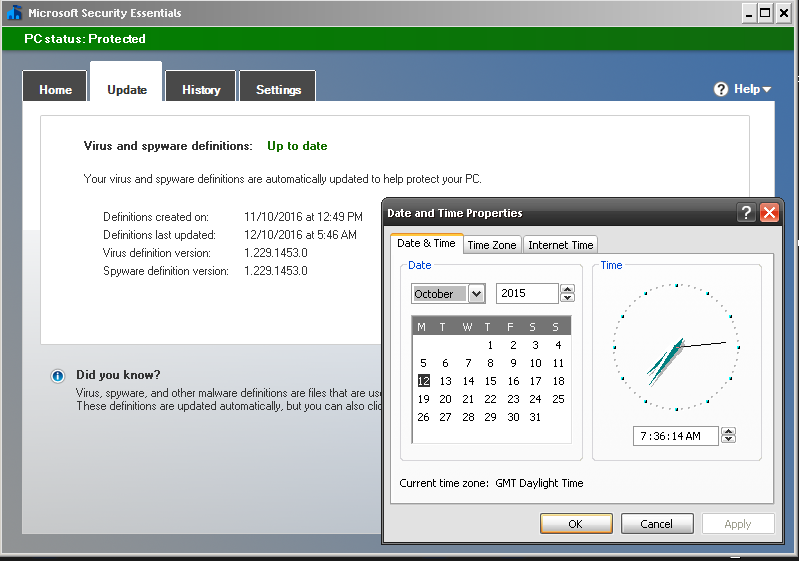
Latest Pattern File October 2016, System Date Set Back 2015 Scan Now Possible
REMEMBER TO SET DATE BACK AFTER SCANNING (if) YOU WISH TO USE Windows Update.. Also Remember, SOME SOFTWARE Can have problems if you run a system with an invalid date. I'm sure someone will make a random patch to fix this at some stage but we are staying LEGAL here.. so NO links in the comments to illegal stuff Thank You.

for some off reason that lads tool  "Fix MSE 1.0" wont run on SP3, says MSE not installed so i had to manually restart the service after i had dumped this code into a BAT file to do the dll's registration.

regsvr32 wuaueng.dll
regsvr32 wucltui.dll
regsvr32 softpub.dll
regsvr32 wintrust.dll
regsvr32 initpki.dll
regsvr32 wups.dll
regsvr32 wuweb.dll
regsvr32 atl.dll
regsvr32 mssip32.dll

Sunday, 9 August 2015

How to temporarily prevent a Windows or driver update from reinstalling in Windows 10

In Windows 10, your device is always kept up to date with the latest features and fixes. Updates and drivers are installed automatically, with no need to select which updates are needed or not needed. In rare cases, a specific driver or update might temporarily cause issues with your device, and in this case you will need a way to prevent the problematic driver or update from reinstalling automatically the next time Windows Updates are installed.

Solution 01:
https://support.microsoft.com/en-us/kb/3073930

Solution 02:
  1. Click the Start button and select Settings.
  2. Inside Windows 10 Settings, click on Update and Security.
  3. when that opens, click on the Advanced Option near the bottom of the right hand sideunder the Windows Update section.
  4. under Advanced Options section "windows will ask how you’d change how updates are installed. By default, the automatic is selected. click on that drop-down menu and select Notify to schedule restart.


Tuesday, 28 July 2015

Windows 8 or 8.1 Won't Install

Having a problem installing windows 8 or 8.1 (or even windows 10)

A lot of old systems won't let you install windows 8 or 8.1 especially the x64 versions
but there is a really simple solution

When you get the error message after rebooting and it says

windows setpup could not configure windows to run on this computer's hardware

Don't click ok.. (or it'll force a reboot)

Just HOLD   SHIFT down and press  F10

When the command prompt opens simply type     msoobe
then press enter.. and then wait a moment...

The screen should go to the enter product key screen (enter one.. or hit skip)
continue with the setup options..

Afterwards type the word   EXIT   on the cmd box
when that closes, click ok on that wouldn't install windows error

Job done....

if typing msoobe gives an error, your CMD window may not be pointed at
C:\Windows\System32\\oobe
if its not, then  type   cd and press enter, then type  cd  again and press enter
then type   cd windows  hit enter,  type  cd system32  hit enter, type  cd oobe  hit enter
then type  msoobe and hit enter..

Search Terms:
Windows 8 Won't Install
Windows 8.1 Won't Install
windows setpup could not configure windows to run on this computer's hardware

windows setup configure windows computer hardware

Skip adding an Email on windows 8 and windows 10?

when it asks for an email, unplug your internet & click BACK
then click next, with no internet you will be offered to set up a normal user account like all other versions of windows...


Wednesday, 1 July 2015

Microsoft Security Essentials 4.5.216.0 Windows XP Red Box Solution

Ok ive been asked this over and over again so i figured id share a little info on this
so your still using xp as PosReady but the MSE pop up is driving you mad?

So.. how about this...


1) you have  4.5.216.0 installed and its Red and the pop up box is driving you mad
Solution, download the one thats on the MS site here OR from filehippo  here then right click the exe and extract it (7zip or winrar will let you do that)  then go into the   x86   folder  and  right click on the file called  epp.msi   and select extract to here,    now open the folder to microsoft security essentials (so its ready to access, normally C:\Program files\Microsoft security client)  now go back in the folder you extracted to, look for a file called    msseces.exe    and right click on it and select CUT   now right click on your task bar and select task manager.. end task on the process called    msseces.exe  then right click on the program files version of the folder & paste (replacing the file) and then re-open MSE from your start menu.
Notice when you go to the little drop down you still have the latest scan engine, malware engine and program version (so windows update WONT downgrade you)  ;)


2) you have the version thats green or red, but is older than 4.5.216.0
Solution, first (if your outdated MSE is still green ut an older scan engine) Make a copy of the file called  msseces.exe because you know that works :)   If its not green, follow the steps above to get access to a clean & green  msseces.exe
 then download Microsoft Security Essentials 4.5.216.0 (if you google good enough you'll find it)
Once you have installed  4.5.216.0, do the end task and put the  older  msseces.exe in the folder (as descriptive in the 1st option above.  And again as above, check the about to see its the new version and scan engine.. yet green..

Last but not least.. the REF database AKA viral Pattern file update link is Here 

also note...
even with the red box, you are still protected if it says its "ON" and its "Up To Date" but i know the green monopoly house is more soothing

remove pop up from MSE

Wednesday, 12 February 2014

Autopatcher Wont Update?


If your using Auto Patcher for windows update you may of noticed a bizarre and very vague message
saying....  Switch Your Apup to www.autopatcher.net/releases.list


To Fix This Click On "OPTIONS"

Change That Highlighted Web Address From .com  To  .net

And You Will Get Your List back


FROM
http://www.autopatcher.com/releases.list

INTO
http://www.autopatcher.net/releases.list


Tuesday, 22 July 2008

How Can I Remove Desk Top Search From Windows XP?


This was a horrible invention, older hard drives sure don't like it, nor do ruthless real time virus scanners. Talk about making a struggling machine even slower.

So you've tried to uninstall it from add and remove programs and it hasn't gone away?

You've looked for desk top search in ad and remove programs and cant even find it?

I have such a simple solution....

Make sure you have "Show Hidden Files On"  and go into your windows folder and look for a FOLDER CALLED      $NtUninstallKB940157$  go inside it

then go into the folder called   spuninst  and Double click the file called  spuninst.exe

That will Uninstal Desktop Search  :)

Wait i don't have a folder called $NtUninstallKB940157$ what do i do?

Well if you REALLY DO HAVE... "Show Hidden Files & Folders ON"

then chances are you ran something to clean up your system, like windows clean up wizzard or CC Cleaner, essentially removed all the Hotfix Uninstallers.

Solution.. Unpack This Folder to the WINDOWS folder then run the spuninst.exe

Wait.. i un-installed this and now i have realised i like it.. Or i think some program installed i didn't think needed it actually does.. maybe want to un-install or use the program but cant?.

Simple, Re-Install the Desktop Search with this, then when your done, un-install it again with the folder solution above, or install it, do the work and only then run something like cc cleaner.

If you don't trust Our sources or your trying to remove this from a totally different OS, just search the download Centre and "Install the one you need or need the uninstaller for" then you'll have the KB folder to allow you to Uninstall
https://www.catalog.update.microsoft.com/Search.aspx?q=KB940157

If it wont re-install, then run it with the   /wuforce  command switch at the command prompt ;)

Meta Data
WindowsSearch-KB940157-XP-x86-enu.exe
WindowsSearch-KB940157-XP-x64-enu.exe