So your microsoft SyncToy Echo Isn't Deleting Files from the right folder (right hand side) ?
I have seen this going on a few forums and i don't understand why people can't get there heads around it.. so i shall try and explain.
When you select Echo mode you MUST start with an Empty Folder (the right folder must be empty)
There is a perfectly good reason for this, one such as it stops synctoy from ever removing a pre-made folder on a drive, like as system restore, recycle bin, hive file and so on.
SyncToy also Creates TWO files when you create a folder pair.. One in the Right side & One in the left. They both hold a list of the contents of the folders/drives and there sizes. This is why SyncToy knows a files and amount of files and sizes on the Right has changed in comparison to the file on the Left (without having to tick the "check files contents" option) which actually when ticked (it takes longer to scan) because it does an MD5 compare on both sides, handy incase a files size is the same but corrupt.
It scans so fast without it due to the TWO dat files it creates
IF you started with the RIGHT side having any contents (THEY'LL NEVER BE MODIFIED) You MUST START with an Empty the right side AND delete BOTH the dat files and then re-create the Folder Pair SetUp from scratch.
The dat Files look like this, it should stand out.. its the one file that wasn't originally put in any folder by you.. Note the Numbers in your file wont be the same as mine, but the two file(s) will look like this
SyncToy_6ec6e2a3-6c63-4267-a8a0-32fd09660c71.dat
Showing posts with label Help. Show all posts
Showing posts with label Help. Show all posts
Saturday, 17 December 2016


Tuesday, 11 October 2016
Microsoft Security Essentials Xp 0x800106ba FIXED
As most XP users are aware, Microsoft Security Essentials now gives the error 0x800106ba when you try to start it, also the service is stopped by something now to.
I haven't looked much into what is causing it as to more looked into a solution, although i don't recommend using XP online anymore (even if you have posReady updates) I can give a simple solution for a Manual Virus scan of the XP.
First Download the MSE update from here and then just set your windows Clock back 1 Year, then double click the Update and it'll install, MSE will go green and you can scan :)
Any other problems, go into Control Panel, Administration Tools, Services, Highlight Microsoft Security Client, hit properties set to automatic then click Start and apply.. But the DATE is important as the 4.5.216.0 version of the APPs life cycle has Expired now folks.
MSE 0x800106ba
REMEMBER TO SET DATE BACK AFTER SCANNING (if) YOU WISH TO USE Windows Update.. Also Remember, SOME SOFTWARE Can have problems if you run a system with an invalid date. I'm sure someone will make a random patch to fix this at some stage but we are staying LEGAL here.. so NO links in the comments to illegal stuff Thank You.
for some off reason that lads tool "Fix MSE 1.0" wont run on SP3, says MSE not installed so i had to manually restart the service after i had dumped this code into a BAT file to do the dll's registration.
regsvr32 wuaueng.dll
regsvr32 wucltui.dll
regsvr32 softpub.dll
regsvr32 wintrust.dll
regsvr32 initpki.dll
regsvr32 wups.dll
regsvr32 wuweb.dll
regsvr32 atl.dll
regsvr32 mssip32.dll
I haven't looked much into what is causing it as to more looked into a solution, although i don't recommend using XP online anymore (even if you have posReady updates) I can give a simple solution for a Manual Virus scan of the XP.
First Download the MSE update from here and then just set your windows Clock back 1 Year, then double click the Update and it'll install, MSE will go green and you can scan :)
Any other problems, go into Control Panel, Administration Tools, Services, Highlight Microsoft Security Client, hit properties set to automatic then click Start and apply.. But the DATE is important as the 4.5.216.0 version of the APPs life cycle has Expired now folks.
MSE 0x800106ba
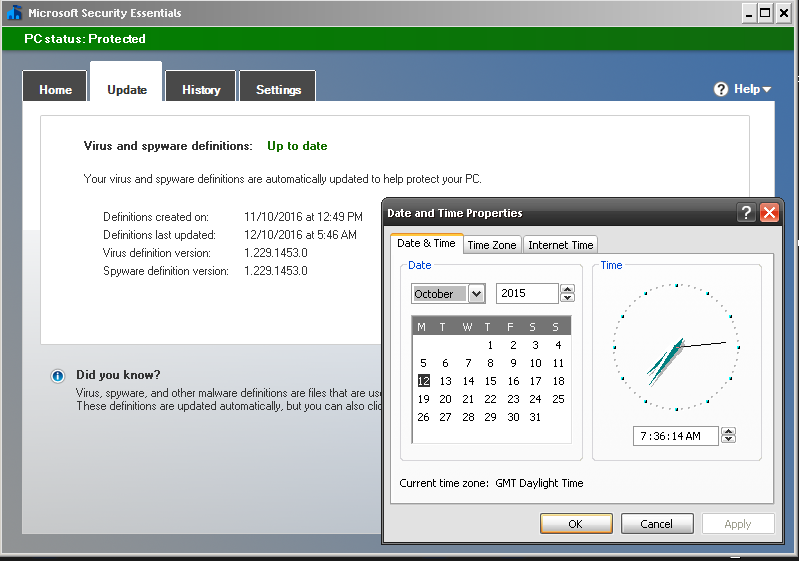 |
| Latest Pattern File October 2016, System Date Set Back 2015 Scan Now Possible |
for some off reason that lads tool "Fix MSE 1.0" wont run on SP3, says MSE not installed so i had to manually restart the service after i had dumped this code into a BAT file to do the dll's registration.
regsvr32 wuaueng.dll
regsvr32 wucltui.dll
regsvr32 softpub.dll
regsvr32 wintrust.dll
regsvr32 initpki.dll
regsvr32 wups.dll
regsvr32 wuweb.dll
regsvr32 atl.dll
regsvr32 mssip32.dll
Sunday, 9 August 2015
Windows Post-Install Wizard (WPI) Tips
Some use full commands and silent install switches for adding software and tweaks to WPI the Windows Post-Install Wizard
first DirectX.. grab your self the JUNE REDIST from microsoft
make a folder called DirectX put the exe in their and Right click on it and select "Extract To Here"
not got that extract option? (install WinRAR its free for basic use)
once you have DirectX extracted to the folder (delete the exe you downloaded, but keep everything that came out of it) then in WPI use the following command & path to run it
{START} "DirectXInstaller" /MIN /w "%wpipath%\Install\DirectX\DXSETUP.exe" /silent
Its important to remember there is a " after the .EXE, then a Space, then the switches
(want to make a complete DirectX Package with it all, read this)
What about adding WinRAR to WIP?
x86 (32bit)
x64 (64bit){START} "WinRarx86Installer" /MIN /w "%wpipath%\Install\Software\x86\WinRAR_x86.exe" /s
{START} "WinRarx64Installer" /MIN /w "%wpipath%\Install\Software\x64\WinRAR_x64.exe" /s
if you use the programs name with architecture including as its UNIQUE ID like WINRARX86 and WINRARX64 then you can add the X64 ID to the x86 Exclude box and vice versa (so only 1 can be chosen)
Microsoft Silverlight? (the singular Q doesn't seam to make it silent any more unless you add /passive)
{START} "MSSLx86Installer" /MIN /w "%wpipath%\Install\Runtime\Silverlight_x86.exe /q /passive
{START} "MSSLx64Installer" /MIN /w "%wpipath%\Install\Runtime\Silverlight_x64.exe /q /passive
Microsoft Download Manager?
"%wpipath%\Install\Software\MS_DL_MAGR.msi" /passive
Hows about a Microsoft .NET exe?
{START} "MSdotNET" /MIN /w "%wpipath%\Install\Updates\NDP452-KB2901907-x86-x64-AllOS-ENU.exe" /passive /norestart
on the Dependency's you could use
getOSver()="Win7"
so it only shows up on windows 7 systems, or use like
getOSver()="Win7" || "Win8" || "Win8.1"
also note you can run a BAT or a CMD file simply using
"%wpipath%\Install\Scripts\NameOfYouBATorCMD.bat"
You may also notice some things clash with others, bat and cmd files seam to hold other stuff back while they work, but launching EXE and MSI files can launch multiples at once, in turn (depending on software choices) you may get windows installer service is in use by another processes, or please wait for the other installer to complete.. solution?
well you could impose the WAIT command using /w
usage wise an example would be...
{START} "MSdotNET" /w /MIN "%wpipath%\Install\Updates\NDP452-KB2901907-x86-x64-AllOS-ENU.exe" /passive /norestart
This shows what's installing on the WPI window
This makes it wait for the current thing running to finish
This runs it minimised to task bar
This would be handy to include with all exe and msi stuff you add, besides the fact you'll save windows installer getting confused, you'll also prevent any MSU files that patch .net failing while .net is actually still installing, but the /w is optional, as is the /MIN.
 |
| My little CMD file in action.. that installs the MSU files |
 |
| the /w command in action making each install wait for the last to finish |
| /sAll | Run installer in silent mode. |
| /sPB | Silent mode with minimum UI: show the progress bar only. |
| /rs | Reboot Suppress. Setup.exe will not initiate reboot even if it is required. |
| /rps | Reboot Prompt Suppress. If reboot is required, the system restarts without warning. |
I would use something like
{START} "AdobeReader" /w /MIN "%wpipath%\Install\Readers\Acrobat.exe" /sAll /rs
something to remember is although seeing progress bars on software lets you know its running all ok, it slows things down (especially if windows is running on a temp native ms video driver)
 |
| WPI installing microsoft .net on Windows 7 SP1 followed by its required updates |
note the main installer is x86 and x64 (so i added a single entry just for x86) i set up the updates after it (so one does the app & its x86 updates) Then to save time (and the fact the updates don't do both) I selected CLONE to make a copy of the x86 and changed all the x86 references to x64.
NOTE:
when it comes to .NET updates, you could have ONE install listed under (both)
and have option to run ALL the actual updates (under it) BUT with a prefix to define Windows Architecture before starting the update..
EXAMPLE
{86} {START} "DotNetX68Up1" /MIN /w "%wpipath%\install\7\Updates\x86\DotNET\NDP45-KB2972107-x86.exe" /passive /norestart
{64} {START} "DotNetX64Up1" /MIN /w "%wpipath%\install\7\Updates\x64\DotNET\NDP45-KB2972107-x64.exe" /passive /norestart
so it has the {86} or the {x64} then {START} a space between the } {
I also used the get os version to only make it show up on windows 7 (due to the EXE updates not really compatible with 8 or 8.1 as most there .net updates are MSU files) I also set the "greyed out option" on the x86 to look for the bits64 thing to set the greyed out on the x64 to the bits32.
This way when the WPI is run on an x64 installed OS it wont even have any visible x86 stuff and when run on an x86 it won't show any x64 stuff.
And to further avoid conflicts i also set the dependencies screen to block any x86 UNIQUE ID if x64 is selected and vice versa under EXCLUDES on the Dependencies screen.
Why wont reg files work? its a problem with WPI.. knock off BOTH the " " symbols
EXAMPLE WORKING
{REGEDIT} %wpipath%\Install\Tweaks\filename.reg
EXAMPLE NOT WORKING
{REGEDIT} "%wpipath%\Install\Tweaks\filename.reg"
DON'T use the " and DON'T add any silent switches (and it'll just work silently) ;)
Microsoft Office ?{START} "Office2007Install" /w "%wpipath%\Install\Office2007\setup.exe" /config config.xml
note that my config.xml has my serial number in and i removed the !! commented lines so it installs the components i want, but note ive left out the /MIN
(that's so it doesn't run minimised) i did that for people who run this and use others keys on their systems (so they essentially need to interact, enter their name and their key for them to use it) So that's not defaulted to /MIN (minimise) so you know when its ready to input details.
I guess if your sound drivers pre-loaded you could have it Chain a sound file Before the app link (like i did the .net updates having app and updates on one) what if you actually chain an audio file then the app (a beep or what ever) so you know when a specific installer is open or pending..
i feel some voice overs coming on for sure LOL.
go on.. seeing as im on a roll.. how about VLC Media Player Silent Install ?
only issue with VLC is you have to set a Language switch (to which English is 1033)
{START} "VLCx86Installer" /MIN /w "%wpipath%\Install\7\Software\x86\VLC_x86.exe" /L=1033 /S
Also note that i use numbers in path for OS version simply because one day they may no longer support that OS with the Latest (this way you always maintain OS backward compatibility as your menu grows)
I also Re-Name them installers to more simple terms (you can get version number by right clicking, hit properties then the version tab) renaming these installers to simple stuff like JaVa_x86.exe makes it easier to Update your Disc/USB by just getting the latest release and renaming that (rather than having to edit loads of the menu boxes) Though you should change the version details on the box that checks what ver is installed and the visual box offering the software to install, you can get that via the EXE's properties once installed via the ?.?.?.? options.. The current VLC for example is 2.2.6.0 ;)
I must be possessed tonight...
MSE Microsoft Security Essentials silent install (windows must already be activated)
{START} "MSE7x64Installer" /MIN /w "%wpipath%\Install\7\Software\x64\mseinstallx64.exe" /s /runwgacheck /o
you can Remove the /o and it'll check online for an update OR you can leave the /o in place so the nets not required and then just Chain the update exe Under it like this..
{START} "MSE7x64Updater" /MIN /w "%wpipath%\Install\7\Software\x64\mpam-fe.exe"
odd shots of WPI's ive messed about with...
(and NO i wont provide these so don't ask for them)

I have more to add to this post with bits ive been working on, messing about seeing if its a viable platform for servicing my own systems. At the moment ive been experimenting with software based interfaces for a mate (who owns this blog, that i sometimes write for...)
My own needs would be more suited to Plugns (audio mainly) VST (stand alone and installers) so many installers, registry tweaks and so on (for varied software) Id like to create an external drive where i can install the likes of "Native Instruments Knokat" or "Reason 5" and have it copy over all the extra stuff for the specific app chosen (i don't have big terrabytes of drive space on my main computer) So i often make a restore point, install something wildly drive hogging with all its extras and then restore back and install something else.. this menu makes system changes like that a breeze...
 |
| Universal Driver Disk Idea |
so you have 3 folders AnyBIT (drivers working on x86 and x64) then you have an x64 folder and an x86 folder.. In them folders you have the Lan, Modem, Network and so on.. make one lot of folders (then while empty copy them to the other 2 dir's
then place drivers in the folders and rename the exe files to setup.exe
then in WPI (dependencies tab, bottom LEFT box) you would add the likes of
FileExists("%wpipath%\Install\Drivers\AnyBIT\Bluetooth\setup.exe")
FileExists("%wpipath%\Install\Drivers\AnyBIT\CaptureCard\setup.exe")
FileExists("%wpipath%\Install\Drivers\AnyBIT\Cardreader\setup.exe")
FileExists("%wpipath%\Install\Drivers\AnyBIT\Chipset\setup.exe")
FileExists("%wpipath%\Install\Drivers\AnyBIT\Dongle\setup.exe")
FileExists("%wpipath%\Install\Drivers\AnyBIT\Fax\setup.exe")
and so on for each one... this way only available drivers would show up on the menu ;)
(speedy way to make these is make one list for AnyBIT)
add them all to the list then in notepad hit edit, find and replace and replace
\AnyBIT\
with
\86\ and click replace all
(yes i have met people who have taken hours to edit a bat file and list like this LOL)
you can also throw the architecture command in line to avoid the wrong one being installed
{OS=Win8.1} {x64} {START} "PrinterDriver" /w "%wpipath%\Install\Drivers\x64\Printer\setup.exe"
that will make WPI skip it if its ticked on a 32bit running OS
feel free to leave your ideas and tweaks in the comments, they may help me and others get more out of this fantastic program.
Remember WPI uses the && || phrasing, so you can also define an OS and Architecture in the (bottom left) dependency box so that stuff wont even show up on systems you don't want it to
this for example would stop it showing up an an x64 windows 8.1 and hide it from every other version of windows its run on
getOSver()=="Win8.1" && getBits()==32
if you wanted it to run on both, you could simply just state getOSver()=="Win8.1"
or be cocky and state
getOSver()=="Win8.1" && getBits()==32 || getBits()==64
so its using the AND and the OR statement
If we wanted to Detect something to see if its already installed (so we don't re-install it)
we could use the Dependencies box on the bottom right, so if it detects the file presence AND its actual installed version number, it'll grey out the option to install it. Using the OR expression you can check both locations (regardless of if its installed in program files.. or program files (x86) by checking Both Paths with the || OR in between
getFileVersion("%PROGRAMFILES%\Malwarebytes Anti-Malware\mbam.exe")>="2.3.55.0" || getFileVersion("%ProgramFiles(x86)%\Malwarebytes Anti-Malware\mbam.exe")>="2.3.55.0"
if its Not installed (OR you have a Newer Version already) it'll grey out the option to install the 2.3.55.0 you added to your install dir in wpi
It opens up some fantastic ideas if you wanted to make a servicing disk, ber in mind windows 7 for example (be it 7 or 7 SP1) is just winver 7, so if you put the disk in a none sp1 machine stuff would show up you'd not want available until SP1 was installed...
So you could check for windows 7 && the service pack 1, or you could check for windows 7 so if you wanted to offer the ability to Install SP1, the left box would be
getOSver()=="Win7" && getBits()==32 && getSPver()==0
or
getBits()==64 && getOSver()=="Win7" && getSPver()==1
the order often has random effects, try your design in different environments
 |
| Example on Windows 10 work in progress from an 8.1 template |
 |
| Example on Windows 8.1 |
How to temporarily prevent a Windows or driver update from reinstalling in Windows 10
In Windows 10, your device is always kept up to date with the latest
features and fixes. Updates and drivers are installed automatically,
with no need to select which updates are needed or not needed. In rare
cases, a specific driver or update might temporarily cause issues with
your device, and in this case you will need a way to prevent the
problematic driver or update from reinstalling automatically the next
time Windows Updates are installed.
Solution 01:
https://support.microsoft.com/en-us/kb/3073930
Solution 02:

Solution 01:
https://support.microsoft.com/en-us/kb/3073930
Solution 02:
- Click the Start button and select Settings.
- Inside Windows 10 Settings, click on Update and Security.
- when that opens, click on the Advanced Option near the bottom of the right hand sideunder the Windows Update section.
- under Advanced Options section "windows will ask how you’d change how updates are installed. By default, the automatic is selected. click on that drop-down menu and select Notify to schedule restart.

Tuesday, 28 July 2015
Windows 8 or 8.1 Won't Install
Having a problem installing windows 8 or 8.1 (or even windows 10)
A lot of old systems won't let you install windows 8 or 8.1 especially the x64 versions
but there is a really simple solution
When you get the error message after rebooting and it says
windows setpup could not configure windows to run on this computer's hardware
Don't click ok.. (or it'll force a reboot)
Just HOLD SHIFT down and press F10
When the command prompt opens simply type msoobe
then press enter.. and then wait a moment...
The screen should go to the enter product key screen (enter one.. or hit skip)
continue with the setup options..
Afterwards type the word EXIT on the cmd box
when that closes, click ok on that wouldn't install windows error
Job done....
if typing msoobe gives an error, your CMD window may not be pointed at
C:\Windows\System32\\oobe
if its not, then type cd and press enter, then type cd again and press enter
then type cd windows hit enter, type cd system32 hit enter, type cd oobe hit enter
then type msoobe and hit enter..
Search Terms:
Windows 8 Won't Install
Windows 8.1 Won't Install
windows setpup could not configure windows to run on this computer's hardware
windows setup configure windows computer hardware
Skip adding an Email on windows 8 and windows 10?
when it asks for an email, unplug your internet & click BACK
then click next, with no internet you will be offered to set up a normal user account like all other versions of windows...

A lot of old systems won't let you install windows 8 or 8.1 especially the x64 versions
but there is a really simple solution
When you get the error message after rebooting and it says
windows setpup could not configure windows to run on this computer's hardware
Don't click ok.. (or it'll force a reboot)
Just HOLD SHIFT down and press F10
When the command prompt opens simply type msoobe
then press enter.. and then wait a moment...
The screen should go to the enter product key screen (enter one.. or hit skip)
continue with the setup options..
Afterwards type the word EXIT on the cmd box
when that closes, click ok on that wouldn't install windows error
Job done....
if typing msoobe gives an error, your CMD window may not be pointed at
C:\Windows\System32\\oobe
if its not, then type cd and press enter, then type cd again and press enter
then type cd windows hit enter, type cd system32 hit enter, type cd oobe hit enter
then type msoobe and hit enter..
Search Terms:
Windows 8 Won't Install
Windows 8.1 Won't Install
windows setpup could not configure windows to run on this computer's hardware
windows setup configure windows computer hardware
Skip adding an Email on windows 8 and windows 10?
when it asks for an email, unplug your internet & click BACK
then click next, with no internet you will be offered to set up a normal user account like all other versions of windows...

Saturday, 6 June 2015
How To Block ANYONE From A Facebook Page Even If They Don't Like It Or Comment WORKING 2015

This has been asked soooo many times.. its been Years now toooo
Most tutorials regard google chrome bah.. well this one you can do it simply with FireFox!! Watch the video.. block the user.. and no more mystery phantom messages you can't block
because after doing this.. that troll is gone.. its dead simple to, so once you've done it, its a lot easier for you to do this than for them to keep making new emails and fb accounts ;)
Other help is on this same page scroll down past the video for other info even your nan could do this...
MISC Help:
Website to turn Profile LINK into the users Facebook ID Number Here
HOW TO BLOCK A PAGE FROM YOUR PAGE??
all you need to do their is make sure after changing the ID number.. you also change the user_id to page_id
Image highlighting the User ID (right click the url as shown in the video to select Edit HTML)

TheWraith517.. HELPING BRING PAIN TO TROLLS EVERYWHERE!!!!
Please Share This.. Help Fight The Trolls..
UPDATE: we've been told by a fb user this is working just as easy with chrome ;)
TECH:
Microsoft Silverlight (plugin) thats what makes the adverts update on facebook, so they change, even if you sit on the same page, the plugin also lets you re-arrange your photos. With that, in turn it'll let you update code in real time (even though its not saved to facebooks servers)
IE. without silverlight you would have to Edit the page save it & then refresh.. that refresh would loose all saved changes & load the unmodified page from fb..
How can you block a facebook user from your page?
How can i block a facebook user from my page?
How to block a user from your facebook page?
How do i block a user from my facebook page?
Sunday, 5 October 2014
Windows 8 Tips, Tricks, Advice And Warnings
Wow windows 8 and 8.1.. Ooooops says someone in a dark corner at microsoft. So what have we got here, well its a scary operating system, especially for those who despised windows xp's "network sharing and login basis in the home os" Windows 8 takes that one level further and begins its walk in the realms of iOS and Android... yes that's right.. windows 8 has a store.. no more are you offered out the box to just simply create a User name and password ON YOUR MACHINE...
You CAN create a "Local Account" if you stick in an email and the wrong password twice (don't click try again, just click create local account)
Here's some Advise (Before you even turn on that New PC or New LapTop)
Hit the net on a different system and create a brand new Hotmail OR Live mail account
On Its "Profile Information" what ever NAME (first and 2nd) will become Your Windows Log On Name AND the PATH to your Documents & Settings..
you may remember these paths on windows XP as simply
C:\Documents and Settings\Users\Your Windows User Name\.. Private Personal Stuff....
Using Your own personal Email to set up windows 8 will make that path your FULL NAME
Now this is something Websites can Read from your machine...
User Name, Operating System, Browser Type and other info like IP and what not...
So that is why i recommend a NEW hotmail or live account for setting it up.
For the noobs i shall go into more detail about why not to use your normal email or an email anyone has in their book.. and this may scare some of the not so noob'ish too. Once you log on, you get a folder on the top left of the desk top view, this folder is ALL the storage upon your email account, as you no on windows live you can store around 10gb of stuff, be it photos videos or even EXE files (anyone accesses your email and it happens to many) they can upload a file, that is something you will inadvertently access when opening your "My Documents" so you NEVER give anyone this email OR use it to mail ANYONE, you don't even add it to your other address books, you just use it to log onto the machine and nothing more (under login options you can log in with a pin) i think the log in with photo is the most pathetic thing ive ever seen so don't use that or even set that up.
Other really bad ideas (network wise) is the fact you can share these SUB Folders with anyone with a windows live account, so your my documents "with a little malware in your system" can make all your personal stuff public (windows gets updates for vulnerabilities ALL the time) Even more oddly you can Share other folders "right over the net like an FTP of sorts" using the hotmail.com live .com websites as an interface to access them folders. SO considering how vulnerable we became moving from windows 98 and Windows Millennium to Windows XP, this shift from XP, Vista or Win7 up to Win8 is a risky business unless your on a "hardware firewall" then it certainly isn't an operating system i would recommend, that said wont be long until you don't have a choice... hence this blog post to try and help.
Note, I don't recommend these 3rd party "Start Menus" because just like windows XP, certain updates like the shell32.dll or even implementations to the UAC system can stop you using your system. BUT what you can do is change the start menu you get with windows 8 to better suit what you need.
You can right click on the "Tiles Start Menu" and select open "location" you'll see your essentially inside the folder view of the classic start menus of yesteryear. Renaming and moving stuff around in their will change what's shown on the tiles menu, then you can also right click the tiles and re-size them. So you can organise the start menu "Old School" in the folder, just like always (remember though some are under "Your Login Name" and others are under the path of "All Users" just in case you get lost trying remove something that appears to be gone, yet shows up, easy mistake in this new environment. Windows 8 Internet Explorer comes with Flash built in, doesn't include java or shockwave.
What ever the OEM virus killer is, i advise you Don't even open that, and if it opens just hit close, go to control panel, programs and features, and Uninstall the virus killer (be it mcafee, norton, panda or what ever) once installed, reboot, go back into control panel and open "Windows Defender" Updated it, now you have a FREE virus killer.
To avoid confusion here, microsoft past and present had its own antimalware, antivirus and a duel package.
IE...
Windows XP = Microsoft Security Essentials <--this is virus killer & anti malware
Windows Vista = Windows Defender <--this is only anti malware
Windows 7 = Windows Defender <--this is virus killer & anti malware
Windows 8 = Windows Defender <--this is virus killer & anti malware
So the misconception that Windows Defender is not a virus killer is only true within Windows Vista and not the others :)
I WILL UPDATE THIS MORE WHEN I HAVE TIME
BUT I WANTED TO POST THIS NOW SO PEOPLE STOP ENDING UP WITH BAD MY DOCUMENTS PATHS AND WACKY WINDOWS USERS NAMES
Friday, 20 June 2014
People Trying To Make Multiple "Blog Posts" Upon Page Tabs, RATHER THAN Comments
People Trying To Make Multiple Blog Posts Upon Pages And Failing lmfao
Ok i have been watching random tutorial videos (them annoying kids who type in notepad with real crappy music blasting away) and i came to the conclusion that every Tutorial on youtube for this was a total Pile of Sh** so i decided to write one for my mate whos been trying to do this for a number of years.. and after looking for videos to "send him" i thought jeeezz screw this lmao
FIRST:
You Need MORE Than ONE BLOG!!! (FACT!!)
don't argue, just deal with it lol
SECOND:
You Create as many blogs (AS YOU NEED PAGES AKA THREADS)
(and Keep the blog names pretty much the same, add a 1 and a 2 at the end of their names)
THIRD:
Create your FIRST Main Blog and get the Template, the Colour Scheme JUST THE WAY "YOU" Want It..
Make sure the Layout, down the sides, the adsense, all that stuff is ALL set up and Sorted...
(FORGET PAGES FOR NOW, SO DON'T MAKE ANY YET)
FORTH:
Save your Blogger "Template" oo yes... now where cooking with code lolz
FIFTH:
Create Your OTHER blogs (that WILL serve as Pages/Forum threads)
and Import your Template Upon each of the other blogs....
SIXTH:
Look at this Image, note i access that BOX from the "Layout Tab" NOT the "Pages Tab"

Use the ADD Link and rather than you adding a Page, Your Adding A Blog (a Thread)
You With This? lmfao, can you even believe this capability Is Their?
Now each TAB/PAGE on your Blogger can be an actual Blog/Forum/Threads....
Tutorial by TheWraith517..
Wednesday, 12 February 2014
Autopatcher Wont Update?
If your using Auto Patcher for windows update you may of noticed a bizarre and very vague message
saying.... Switch Your Apup to www.autopatcher.net/releases.list

To Fix This Click On "OPTIONS"


FROM
http://www.autopatcher.com/releases.list
INTO
http://www.autopatcher.net/releases.list
Friday, 1 November 2013
Instant Reboot Restart Shortcut On Desktop
A Faster Way To Reboot The Machine?
right click on the desktop and select create shortcut
Enter this code:
the text in Red you can change
the Time in Green you can also change
Works on the following versions of windows
Windows XP (inc SP1 SP2 & SP3)
Windows Vista (inc SP1 & SP2)
Windows 7 (inc SP1)
Windows 8
Windows 8.1
Windows 10
right click on the desktop and select create shortcut
Enter this code:
%windir%\system32\shutdown.exe -r -t 05 -c "Reboot Initiated Windows Restarting Now"
the text in Red you can change
the Time in Green you can also change
Works on the following versions of windows
Windows XP (inc SP1 SP2 & SP3)
Windows Vista (inc SP1 & SP2)
Windows 7 (inc SP1)
Windows 8
Windows 8.1
Windows 10
Instant Shutdown Shortcut On Desktop
A Faster Way To Shutdown The Machine?
right click on the desktop and select create shortcut
Enter this code:
the text in Red you can change
the Time in Green you can also change
Works on the following versions of windows
Windows XP (inc SP1 SP2 & SP3)
Windows Vista (inc SP1 & SP2)
Windows 7 (inc SP1)
Windows 8
Windows 8.1
Windows 10
right click on the desktop and select create shortcut
Enter this code:
%windir%\system32\shutdown.exe -s -t 05 -c "Admin Has Initiated ShutDown"
the text in Red you can change
the Time in Green you can also change
Works on the following versions of windows
Windows XP (inc SP1 SP2 & SP3)
Windows Vista (inc SP1 & SP2)
Windows 7 (inc SP1)
Windows 8
Windows 8.1
Windows 10
Friday, 21 June 2013
how do I link my youtube channel to my adsense account

Recently saw this question.. how do I link my youtube you tube channel or a 2nd channel on the same google adsense account? and saw people just plugging videos and chatting crap....
here is the most simple way to link adsence to a/any youtube account....
LOG IN To "your" adSence...
COPY "your" publisher ID to a Text File...
Log OUT...
LOG IN to "your" youtube OR your NEW youtube
(you can do this on as many youtube accounts as you want)
BUT.. you MUST be logged into the YOUTUBE you want to add the ID to and NOT the adSense email its self... unless that's your ONE single email for everything
Anyway log into the youtube you want link to adsense to and then use this link
https://www.youtube.com/account_monetization?action_adsense_connection=1
https://www.youtube.com/account_monetization?action_adsense_connection=1and enter the publisher ID.. and Save.. thats it.. done and bloody simple :D
as long as youtube has the login cookie, opening the page will relate the HTTPS to the account your logged into.. Essentially a Direct Link to the page...
cuts through the CRAP.. note if THEY change the link down the line...
Then it is irrelevant to this tutorial (written 26th Jan 2013)
Wi-Fi Virgin Media Netgear DGN1000 ADSL Router Problems Dropping Signal Help

Ive recently been experiencing problems with Virgin Media since they have been doing work on the National ADSL Service. I was extremely disappointed having to troll round the internet, because to be honest i no my stuff when it comes to computers.
So their i am looking on the Netgear website for a possible firmware update (like most of you even no what that is right?) Like virgin media is going to tell customers their have been atleast SIX updates for my router and i have NEVER been notified... makes you wonder why they didn't do it remotely...
So if your Wi-Fi is dropping and your a virgin media customer (especially on ADSL) their is an Update for your Router (that little black box with the aerial)
After going round in circles on the netgear site looking for a more modern firmware than the one i had, i decided to start googling around to see what i could find, and after about 10 mins i found a website that linked Directly to a Virgin media page... yet google couldn't just get me right to the page (way to go richard bransons team not being able to dominate the google search)
So i ended up HERE
BUT.. PLEASE REMEMBER THIS IS FOR THE ADSL ROUTER
IF you have a Virgin Media Cable Router, just turn it off for 5 mins then turn it back on and wait 10 mins for it to fully boot (the normal cable "Super Hub" ones auto update when power is shut off & and restarted)
If you have a netgear actual cable modem (not adsl) try the link at the bottom of this post
National router firmware update
If you’re using the National Netgear N Series router and you’re having trouble with the wireless connection you can update the router’s firmware to fix the problem.
- Download NationalFirmware2012.zip which contains your router's new firmware and instructions for applying it.
- Right click the NationalFirmware2012.zip file and select Extract or Unzip.
- Open the document: "006020NationalWirelessRouterIssues_Instructions_v1.pdf"
and follow the steps to update the router's firmare.
Its a little naughty that my firmware version ENDED in .19 and the new one ends in .25
thats a fair few fixes my system was missing...
The zip file comes with an ADOBE PDF File, which has full pictures with instructions
to check if your model is ADSL just look at where it plugs in the wall IE.. Is it exactly the same as a phone socket... if it is then its adsl
code on the back may also be DGN1000SP or possibly DGN1000
If you have the , read here and the link below
ALSO MASSES OF NETGEAR Help Right here (site can be slow at times, says a lot lmfao)
Tuesday, 13 July 2004
PeBuilder Common Problem loadKey failed
I get this error: Loading "C:\pebuilder\setuphiv" Error: loadKey failed:
can't delete folder until after you reboot
Get AUTORUNS by sysinternals
run it.. look for a start up entry called UPCLEAN
it apparently speeds up logons and log offs but interacts with the Hive
this is why it can't load the hive and get the key (as its already loaded via UpClean)
so disable it, reboot, try again ;)
can't delete folder until after you reboot
Get AUTORUNS by sysinternals
run it.. look for a start up entry called UPCLEAN
it apparently speeds up logons and log offs but interacts with the Hive
this is why it can't load the hive and get the key (as its already loaded via UpClean)
so disable it, reboot, try again ;)
Subscribe to:
Posts (Atom)