Showing posts with label Error. Show all posts
Monday, 16 July 2018
KB4340558 Won't Install
So you can't install KB4340558 ?
First you need to view Update History (use the search on the top right of the update history box)
Search for KB4229727 and Uninstall it
Search for KB4096417 and Uninstall it
Then REBOOT
Then open the command prompt as an admin and type
(or copy this then click the top left corner of cmd box, select edit then paste)
Dism /Online /NoRestart /Cleanup-Image /StartComponentCleanup
after that Reboot..
Then try and install just KB4340558 on its own
Reboot twice after that then check for updates....
COMMON PROBLEMS ?
Error: 14098
The component store has been corrupted.
RUN this at the command prompt
DISM /Online /Cleanup-Image /RestoreHealth
Still having problems ? (maybe your antivirus)
Add an exclusion for C:\Windows\WinSxS
Also add an exclusion for process dism.exe
in your antivirus.. just remember to remove the exclusions when your done.
Sunday, 26 March 2017
you may want to run apt-get update to correct these problems
Ever been struck with you may want to run apt-get update to correct these problems ?
Here is how to fix it..
Open Cydia, look along the bottom for "Sources" Select that, then on the top Left hand side tap "Refresh" that is the same as trying to run apt-get from the terminal.. job done :)
Here is how to fix it..
Open Cydia, look along the bottom for "Sources" Select that, then on the top Left hand side tap "Refresh" that is the same as trying to run apt-get from the terminal.. job done :)
Friday, 14 October 2016
FIX A script on this page may be busy, or it may have stopped responding
Here is something a lot more people are currently facing and we asked our nerd to do what he does
A script on this page may be busy, or it may have stopped responding
Common problem isn't it?, even for PC techs who have hunted high and low for Malware, reset settings, UN-installed browsers, Re-Installed browsers, updated java, updated flash, shockwave and nada, same old problem and your thinking CPU or hard disk issues, maybe ram..
Just some web pages, especially really active facebook profiles or facebook pages with masses of links to external content and bang, the browser just hangs and says not responding.
Anyways (bob) our wacky bug hunter decided to look at this problem from another perspective. He has this massive argument relating to web browsers and people who don't update internet explorer. I don't use it they say, so i don't update it they say, and he says it's an out dated web browser that can be used by malware, its an active door that's out dated you must update it even f you don't use it, regardless of the security implications you must realise that a Proxy, and other winsock kinda stuff is managed via Internet Explorers Options regardless of what browser you use, your main browser still depends on Components related to internet explorer and their lays the problem with newer versions of Windows and a simple fix relating to Power settings.
![]() |
| This Is Wrong |
![]() |
| This Is Correct |
If you still have problems after this then its a Real script error or malware, but this has been tested and it solved the problem on the specific machine we contacted him over. Both where set to use less power on ALL the power profiles, we just changed it, restarted machine and no more facebook script problems.
Tuesday, 11 October 2016
Microsoft Security Essentials Xp 0x800106ba FIXED
As most XP users are aware, Microsoft Security Essentials now gives the error 0x800106ba when you try to start it, also the service is stopped by something now to.
I haven't looked much into what is causing it as to more looked into a solution, although i don't recommend using XP online anymore (even if you have posReady updates) I can give a simple solution for a Manual Virus scan of the XP.
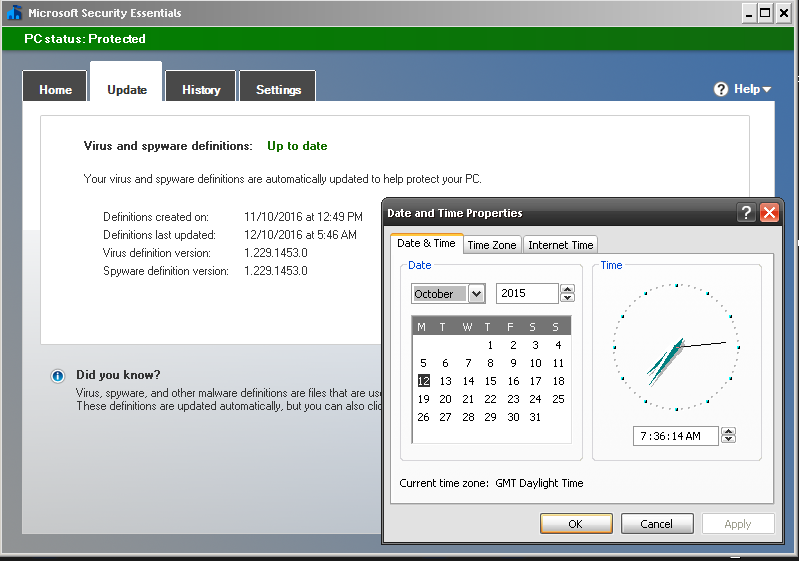
First Download the MSE update from here and then just set your windows Clock back 1 Year, then double click the Update and it'll install, MSE will go green and you can scan :)
Any other problems, go into Control Panel, Administration Tools, Services, Highlight Microsoft Security Client, hit properties set to automatic then click Start and apply.. But the DATE is important as the 4.5.216.0 version of the APPs life cycle has Expired now folks.
MSE 0x800106ba
REMEMBER TO SET DATE BACK AFTER SCANNING (if) YOU WISH TO USE Windows Update.. Also Remember, SOME SOFTWARE Can have problems if you run a system with an invalid date. I'm sure someone will make a random patch to fix this at some stage but we are staying LEGAL here.. so NO links in the comments to illegal stuff Thank You.
for some off reason that lads tool "Fix MSE 1.0" wont run on SP3, says MSE not installed so i had to manually restart the service after i had dumped this code into a BAT file to do the dll's registration.
regsvr32 wuaueng.dll
regsvr32 wucltui.dll
regsvr32 softpub.dll
regsvr32 wintrust.dll
regsvr32 initpki.dll
regsvr32 wups.dll
regsvr32 wuweb.dll
regsvr32 atl.dll
regsvr32 mssip32.dll
I haven't looked much into what is causing it as to more looked into a solution, although i don't recommend using XP online anymore (even if you have posReady updates) I can give a simple solution for a Manual Virus scan of the XP.
First Download the MSE update from here and then just set your windows Clock back 1 Year, then double click the Update and it'll install, MSE will go green and you can scan :)
Any other problems, go into Control Panel, Administration Tools, Services, Highlight Microsoft Security Client, hit properties set to automatic then click Start and apply.. But the DATE is important as the 4.5.216.0 version of the APPs life cycle has Expired now folks.
MSE 0x800106ba
| Latest Pattern File October 2016, System Date Set Back 2015 Scan Now Possible |
for some off reason that lads tool "Fix MSE 1.0" wont run on SP3, says MSE not installed so i had to manually restart the service after i had dumped this code into a BAT file to do the dll's registration.
regsvr32 wuaueng.dll
regsvr32 wucltui.dll
regsvr32 softpub.dll
regsvr32 wintrust.dll
regsvr32 initpki.dll
regsvr32 wups.dll
regsvr32 wuweb.dll
regsvr32 atl.dll
regsvr32 mssip32.dll
Sunday, 18 January 2015
People Can't Reply To Me On Youtube? SOLVED
People Can't Reply To Me On Youtube?
People Can't Reply To You On Youtube?
Select the youtube account on the top right of the youtube page drop down...
Then click on the FACE/PROFILE image to go to Google+
when Click the google (top LEFT) and select settings
SEE IMAGE....
People Can't Reply To You On Youtube?
Select the youtube account on the top right of the youtube page drop down...
Then click on the FACE/PROFILE image to go to Google+
when Click the google (top LEFT) and select settings
SEE IMAGE....
Wednesday, 12 February 2014
Autopatcher Wont Update?
If your using Auto Patcher for windows update you may of noticed a bizarre and very vague message
saying.... Switch Your Apup to www.autopatcher.net/releases.list
To Fix This Click On "OPTIONS"
Change That Highlighted Web Address From .com To .net
And You Will Get Your List back
FROM
http://www.autopatcher.com/releases.list
INTO
http://www.autopatcher.net/releases.list
Saturday, 26 October 2013
iPhone and iPad Bogus Update Notifications
iPhone and iPad bogus update notifications ?
I have seen a lot of people asking and no one answering, so here is the answer to the question
Q) The app store says there are updates and when i go onto it, it says all my apps are up to date?
A) If it says there are say 5 or 10, 15 updates and when you hit it there's none their its because your running an OLDER iOS IE.. there ARE updates for that amount of apps you have notifications for, BUT the updates require iOS 7 or above so when it opens it wont give you them or show you them ;)
Note to apple (if your reading) you should show the apps and upon trying to install it should say its for an older version and you can't
Q) why wont they do that ?
A) because it'll say its for a newer version.. BUT would you like to install a compatible version?...
then it'll proceed to download and install the exact version you already have...
sloppy code lolz
See i use garageBand and iOS 6.1.4, i don't get told their is an update, i just get a number over the app store icon, but if i go to the garageband "app store page" the download button says update, then says i can't and installs the one i already have ROFL
App store error problem
Monday, 14 October 2013
Windows XP BITS Update Nightmare Fixed
| Your ERROR Code May Look Different.. But Same Solution |
I was recently having murder updating a windows XP machine, I could access the updates but each download said FAILED, I tried the windows update fix-it, the microsoft update fixit, even tried forcing the re-install of the windows update package with the /wuforce command, all to no avail.
Then I noticed in my Windows Services that BITS was missing gone done a bunk and fkd off
Then suddenly i noticed it, but instead of BITS it was listed as
Display Name @%SystemRoot%\system32\qmgr.dll,-1001
Description @%SystemRoot%\system32\qmgr.dll,-1000
I was unable to start the Bits service
Then i realized the Display name was to throw off I.T guys, they see the string and assume yeah its their
but its not, it should be listed as this..
Display Name BITS
and the description should be
Description @%SystemRoot%\system32\qmgr.dll,-1001
Path to executable C:\WINDOWS\system32\svchost.exe -k netsvcs
to restore the bits service, create a TEXT file and paste this code into it
(make sure NO lines have spaces at the end or random symbols word wrap OFF)
REG FILE FOR WINDOWS XP ONLY (Home/Pro/Corp/Media Center)
Windows Registry Editor Version 5.00
[HKEY_LOCAL_MACHINE\SYSTEM\CurrentControlSet\Services\BITS]
"Type"=dword:00000110
"Start"=dword:00000002
"ErrorControl"=dword:00000001
"ImagePath"=hex(2):25,00,53,00,79,00,73,00,74,00,65,00,6d,00,52,00,6f,00,6f,00,\
74,00,25,00,5c,00,73,00,79,00,73,00,74,00,65,00,6d,00,33,00,32,00,5c,00,73,\
00,76,00,63,00,68,00,6f,00,73,00,74,00,2e,00,65,00,78,00,65,00,20,00,2d,00,\
6b,00,20,00,6e,00,65,00,74,00,73,00,76,00,63,00,73,00,00,00
"DisplayName"="BITS"
"DependOnService"=hex(7):52,00,70,00,63,00,53,00,73,00,00,00,00,00
"DependOnGroup"=hex(7):00,00
"ObjectName"="LocalSystem"
"Description"="@%SystemRoot%\\system32\\qmgr.dll,-1001"
"FailureActions"=hex(0):00,00,00,00,00,00,00,00,00,00,00,00,03,00,00,00,68,e3,\
0c,00,01,00,00,00,60,ea,00,00,01,00,00,00,60,ea,00,00,01,00,00,00,60,ea,00,\
00
"DelayedAutoStart"=dword:00000001
"ServiceSidType"=dword:00000001
"RequiredPrivileges"=hex(7):53,00,65,00,43,00,72,00,65,00,61,00,74,00,65,00,47,\
00,6c,00,6f,00,62,00,61,00,6c,00,50,00,72,00,69,00,76,00,69,00,6c,00,65,00,\
67,00,65,00,00,00,53,00,65,00,49,00,6d,00,70,00,65,00,72,00,73,00,6f,00,6e,\
00,61,00,74,00,65,00,50,00,72,00,69,00,76,00,69,00,6c,00,65,00,67,00,65,00,\
00,00,53,00,65,00,54,00,63,00,62,00,50,00,72,00,69,00,76,00,69,00,6c,00,65,\
00,67,00,65,00,00,00,53,00,65,00,41,00,73,00,73,00,69,00,67,00,6e,00,50,00,\
72,00,69,00,6d,00,61,00,72,00,79,00,54,00,6f,00,6b,00,65,00,6e,00,50,00,72,\
00,69,00,76,00,69,00,6c,00,65,00,67,00,65,00,00,00,53,00,65,00,49,00,6e,00,\
63,00,72,00,65,00,61,00,73,00,65,00,51,00,75,00,6f,00,74,00,61,00,50,00,72,\
00,69,00,76,00,69,00,6c,00,65,00,67,00,65,00,00,00,00,00
[HKEY_LOCAL_MACHINE\SYSTEM\CurrentControlSet\Services\BITS\Parameters]
"ServiceDll"=hex(2):25,00,73,00,79,00,73,00,74,00,65,00,6d,00,72,00,6f,00,6f,\
00,74,00,25,00,5c,00,73,00,79,00,73,00,74,00,65,00,6d,00,33,00,32,00,5c,00,\
71,00,6d,00,67,00,72,00,2e,00,64,00,6c,00,6c,00,00,00
[HKEY_LOCAL_MACHINE\SYSTEM\CurrentControlSet\Services\BITS\Security]
"Security"=hex:01,00,14,80,90,00,00,00,9c,00,00,00,14,00,00,00,30,00,00,00,02,\
00,1c,00,01,00,00,00,02,80,14,00,ff,01,0f,00,01,01,00,00,00,00,00,01,00,00,\
00,00,02,00,60,00,04,00,00,00,00,00,14,00,fd,01,02,00,01,01,00,00,00,00,00,\
05,12,00,00,00,00,00,18,00,ff,01,0f,00,01,02,00,00,00,00,00,05,20,00,00,00,\
20,02,00,00,00,00,14,00,8d,01,02,00,01,01,00,00,00,00,00,05,0b,00,00,00,00,\
00,18,00,fd,01,02,00,01,02,00,00,00,00,00,05,20,00,00,00,23,02,00,00,01,01,\
00,00,00,00,00,05,12,00,00,00,01,01,00,00,00,00,00,05,12,00,00,00
[HKEY_LOCAL_MACHINE\SYSTEM\CurrentControlSet\Services\BITS\Enum]
"0"="Root\\LEGACY_BITS\\0000"
"Count"=dword:00000001
"NextInstance"=dword:00000001
save the file, then right click on it and RENAME, call it BitFix.reg, click ok on the warning
then right click on the file and Merge into registry, or double click it
when asked to add info to registry, say yes, once imported click ok
NOW REBOOT, and go straight to windows update after reboot,
the service will be running, so don't waste time checking as your pc needs updating asap
Incase what ever you were OR are infected with tries to exploit another vulnerability in your out dated system
UPDATE WINDOWS ASAP
For help on windows 7 or vista, google windows background intelligent transfer service missing
Its normally an Alternate fix
SOME POPULAR WINDOWS UPDATE FIXES ARE LISTED BELOW
click start, then at the bottom in the box you can type, type CMD
when it appears at the top RIGHT CLICK on it and RUN AS ADMINISTRATOR
then Right click by the flashing cursor and COPY THIS
sc create BITS binpath= "c:\windows\system32\svchost.exe -k netsvcs" start= delayed-auto
paste this into the cmd box and hit enter
Other Microsoft Update Fixes for Bits
Vista 32BIT reg fix topic (USE THEIR REG FILE)
Windows 7 reg fix topic (USE THEIR REG FILE)
Another VISTA Solution Here
If you get Permission errors on 7 or Vista (and you ran CMD as admin) then Read Here
I DON'T steal files or links, i make my own or point to resources
(the XP reg script is a Direct Export from a working XP System of my own)
IE, if you have TWO exact operating systems you can export the key your self
and import on system 2 (they don't have to be the same model pc) just the same windows version
Google Search Key Words
Background Intelligent Transfer Service is missing in XP
bits not in service
Background Intelligent Transfer Service (BITS) missing
Downloading Download Microsoft Security Essentials 4.3.219.0 Failed
Windows Update Error
Windows Update Failed To Install
Microsoft Update Error
Can't Access Windows Update
Can't Access Microsoft Update
Windows Update Wont Work
Windows Update Broken
Windows Update Problem
Friday, 21 June 2013
Error Updating Installing Microsoft Dot NET
If your reading this in relation to KB2833941 Error code 65535 , all you need to do with that one is (with 7zip OR Winrar) just right click on the KB2833941 EXE file and extract it then run the MSP file inside :)
If your here in relation to being unable to install KB951847 a.k.a Microsoft .net framework 3.5 SP1 then read this guide here.
For other 1.1 SP1 update fixes, read the rest of this post..
So you get an error when you try windows update
and it comes up failed when you run KB2698023 or KB2742597 or some other 1.1 SP1 hotfix
and it keeps on bugging you that you need that update....
I guess maybe you even tried downloading "netfx.msi" as advised on OTHER places ROFL
And its told you A Resource within netfx1.cab was is unavailable?
well it would... as you don't have it like (as u only downloaded the msi)
Here is what you do....
FIRST... (and DON'T JUMP THE GUN)
DO NOT JUST UNINSTALL EVERY .NET LIKE WEBSITES TELL YOU TO!
Download THIS (the update with the issue) NDP1.1sp1-KB2698023-X86.exe
OR This one
Download THIS (the update with the issue) NDP1.1sp1-KB2742597-X86.exe
OR This one
Download THIS (the update with the issue) NDP1.1sp1-KB2833941-X86.exe
(you only need 1, and then maybe the other, use the one your update failed on)
Both Files Come Direct From Microsoft (DO NOT INSTALL IT YET)
Now... Download THIS...
Microsoft .NET Framework Version 1.1 Redistributable Package
From Microsoft HERE (DON'T INSTALL IT)
RIGHT CLICK ON dotnetfx.exe
and select EXTRACT TO dotnetfx
(this will give you 5 files, you need these for 5 mins)
No extract option? install winZip or 7zip (their both free) or extract with WinRAR
now with those files extracted,,, RUN EITHER
NDP1.1sp1-KB2698023-X86.exe
OR
NDP1.1sp1-KB2742597-X86.exe
and Install it...
when Asked for "netfx.msi"
Browse to it (where YOU extracted the other one) and the installation should accept it and finalize
simply because I am smart and Microsoft are not..... cant believe they fkd this up with a replacement
DON'T just Google dotnetfx.exe
if the MS link changes.....
GO TO http://download.microsoft.com
and search for it their and MAKE SURE you get .NET 1.1 version of dotnetfx.exe (not the 1.0)
Oooo and yes.... it works on them all....
And i can't believe some of the sites ive seen telling people to uninstall ALL .NET and start installing them all from scratch.... wtf do u do next time MS do this... uninstall it all again? wtf people
oddly replaces the last update yet causes the same problem
good old Microsoft.. BAH...
USEFUL INFO FOR THE TECHS:
Because it keeps doing this on certain systems with certain Updates ive started creating a folder HERE on the computer Like This
C:\WINDOWS\Microsoft.NET\DOTNET.1.1SorceMSI
That way its their for future problems with the files ready for me
![]() |
| Just an Example, You CAN Put your Folder Anywhere |
Microsoft.net is also really messy
After your told to reboot and the pc comes back on, .net is still installing stuff
and sometimes even after a 2nd reboot, its still installing stuff and making system changes
so before attempting another update test
its best to open "Task Manager" and keep an eye out for
2 EXE files that appear and then disappear, make sure their both done and gone
(don't try to close them, let them work)
these are the files that are normally going after 2/3 reboots
they will stay their (until i reboot again)
and they maybe back again after the reboot
its hard to tell if their modifying .net 1.1, 2.0, 3.0, 3.5 or v4
but until their gone, .net isn't fully updated
yet have you ever seen windows update tell you to reboot your pc 5 times in a row after updates?, ive not seen that, yet that's what it takes.... so it could be 5 days after actually updating that all the fixes are applied.. depending on how often you boot and shut down the pc... that's kinda bad...
NOTE:
sometimes only the mscoresvw.exe is visible
but a reboots needed till it goes away
FINAL NOTE:
if it fails, Re-Extract the dotnetfx.exe
Don't really no why, but i think the installer modifies the MSI from the last time you did it ;)
Easy Work Around?
well theres a way around this, but its slow
what you do is only install the ,NET 1.1 updates (and reboot twice)
then install the ,NET 2 updates (and reboot twice)
then the 3 and then the 3.5 and then the 4
this way is slow, but appears to work
also you could make a bat file that installs .net and updates
then reboots the pc and checks for one of the Specific KB UPDATE folders in the win dir
and if its seen it skips to installing .net 3.5, then reboots checks for 1,2 or 3 and then does v4
then its just a case of adding each update to a folder & the bat
you could also mark the bat out with #DOT_NET_1.1 and DOT_NET_1.1_Updates
and manually evoke the bat from a menu bat to skip to install OR just update
GOOGLE METADATA
KB2742597 error
KB2698023 error
KB2836939 error
KB2836940 error
KB2836941 error
KB2835393 error
KB2833941 error
KB2833940 error
KB2832411 error
KB2832407 error
KB2840628 error
KB2840629 error
KB2844285 error
KB2840628 error
KB2844285 error
KB2836939v3 error
KB2858302v2 error
KB2863239 error
KB2861189 error
KB2861697 error
KB2861188 error
KB2858302 error
KB2836939 error
KB2833941 error 65535
Microsoft, dot net, .NET, Dotnet, Windows, Windows Update, Fail, Failed
Subscribe to:
Posts (Atom)