So you upgraded to 10 and wana downgrade to 8.1 or you just set up an 8.0 machine and your thinking theirs gotta be a faster way to get 8.0 right up to date with 8.1?
First remember Microsoft now allow users to download almost every Windows 8.1 (that's legal for the public) but clearly that's a lot of downloading just to find the right OS, you could use PIDGEN to determine your exact version of windows 8 or 8.1 (then use the windows 8.1 media creation tool to download an 8.1 (your 8.0 key will work with the 8.1 download) as long as you pick the right version, IE, Core, CoreN (sadly you can't download the 8.1 with Bing AKA CoreConnected (unless you torrent a few ISO names)
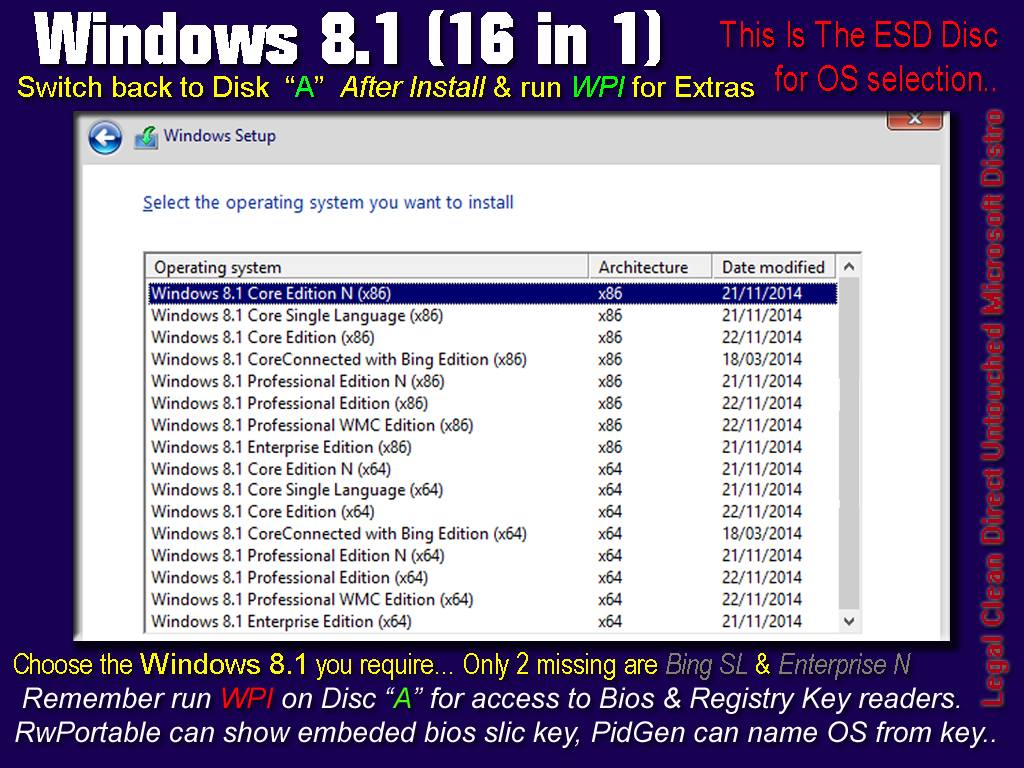
How i built my 8.1 DVD and made Picking an OS "Optional"
Ber in mind it is LEGAL to download windows 8.1, install it with NO serial number.. then go to Update and click Buy Product Key (online) so it is worth having an 8.1 disk where you can PICK the version you want to install, and yet have a version that can Detect a Bios AND a Manually entered key.. heres how...
Download
Windows 8.1 CoreN x86 and x64
Windows 8.1 Core Single Language x86 and x64
Windows 8.1 Core x86 and x64
(you only need them 3 legally speaking, don't download pro as it installs as Core and then wants Pro upgrade key.. so downloading pro will involve 2 keys and 2 activations, thats messy)
if you wish to download and add Enterprise, Enterprise N, CoreConnected and CoreConnected SL from a torrent
(then that's your choice)
So far
(in the order of size & tidiest way to merge them) you have CoreN, CoreSL and Core
Number them like this
01 Windows 8.1 CoreN (x86)
02 Windows 8.1 Core Single Language (x86)
03 Windows 8.1 Core (x86)
make a COPY of CoreN and Name It
04 Windows 8.1 Professional N (x86)
(open this copy in a WIM manager like Win ToolKit)
Click mount the image, once mounded, select Upgrade Image
(and select Professional)
Un mount saving changes... Do that for the 01, 02, 03 cores, and you'll have 3 pro's that install AS Pro!!
(now giving you 6 versions rather than 3)
Now, make a Copy of Each Pro.. give them the name Professional WMC, mount each one and do the upgrade image to Professional WMC
Now
(with them numbered and what not) and if you downloaded enterprise or what ever
Make a "copy" of CoreN x86 WIM file and call it install.wim
Then Microsoft Tool Kit, select Wim Manager and Import the x86 wims one by one in the order they should be from number
(and save / rebuild WIM)
Then import the x64 wim files, when its finished select Rebuild
and you will have them ALL within 1 install.wim
(optionally you can use ESD2WIM-WIM2ESD-dism to crush it into an ESD and save up to 1.2GB)
SetUp from ESD is only compatible with windows 8 or Higher...
Unlike windows 7, to be able to select a Windows 8.1 you actually need an ei.cfg file inside the disks Sources folder with the following information
[Channel]
Retail
[VL]
0
That forces the setup exe to list all the images inside the WIM or the ESD
If you don't have that ei.cfg file in the sources folder then setup.exe WILL look at the motherboard for a Serial number in the Bios (
if it finds one it'll OK your key) and offer you an x86 or x64 for your serial.
(thus guaranteeing your activation is easy and legal)
 |
| With the EI.CFG file in place |
Remember the media creation tool downloads can take 8.0 or 8.1 keys so letting the setup exe and bios work with the WIM or ESD can find the exact version that was shipped with the system.
 |
| It Knows the Exact version of 8.1 your Product Key is designed for |
It checks every WIM you imported into the one file against the SKU and product key
then offers BOTH 86 and 64 for that specific OS...
OR you can have the EI.CFG "INSIDE" the sources folder and Choose an OS..
(remember this is legal as they need a key and activation within 30 days)
Note that RWPortable WILL run in a PE setup environment, so if you stuck that in your rout, then before clicking Install you
held Shift and pressed F10 to open a command prompt and typed C: and hit enter
(then typed RW and hit enter) you could poke about the bios for the systems slick key
(but that only gets you the key) Sadly the likes of PIDGEN wont run properly under PE environments.
BUT You could let setup.exe and your wicked ESD do the job for you by simply removing the CFG file to let setup find the motherboards product key.
For this i have created my own CMD file that is inside the root of my USB
(the source i mainly restore 8.1 onto systems with) sometimes i learn it was a windows 7 system, so the user is then forced with 2 legal choices.. put the right 7 bk in
(get free upgrade to 10) or buy 8.1, a choice of which i can offer in hand with a Clean install of any legal os..
My CMD file looks On my USB for the
ei.cfg, If it finds it it warns me its in place and asks if i wish to remove it (and vice versa when its been removed)
Here it is running where i can choose an OS the user would later have to purchase
 |
| Detects the file and within windows you can see the file |
 |
| It will then offer you these choices |
 |
| After Deleting the file i get this screen |
 |
| Now if offers the option to restore it and recheck for it |
To begin with you need the ei.cfg in your sources folder and a copy of it called ei.bak
then my script called CheckKey.cmd (placed in the root of your USB)
@echo off
TITLE Windows 8.1 Version Select - Enable and Disable Script
color C
@echo off
:START
:Checking For The Product Key and Version Config File
IF NOT EXIST %CDROM%\sources\ei.cfg goto MENU2
IF EXIST %CDROM%\sources\ei.cfg goto MENU1
ECHO.
:MENU1
cls
color 47
ECHO.
ECHO.
ECHO The Product key (ei.cfg) file has been detected in sources folder.
ECHO.
ECHO With the existance of EI.CFG, Setup.exe Can't check the Bios for Embeded KEYs
ECHO EI.CFG also stops you Manually Entering your KEY Until After Setup
ECHO.
ECHO With that factor in mind (without ei.cfg) you Can let setup.exe
ECHO A - Auto Detect Machines Bios SliC Key (Jumps to architecture choice)
ECHO B - Allow You Manual Entry Of Product Key (Jumps to OS and architecture choice)
ECHO The product key, ESD and Setup auto defines which 8.1 is Valid for that key
ECHO.
ECHO If Setup accepts the Product Key you will see both x86 and x64 for the
ECHO 8.1 Release the Product Key is valid for, be it Core, CoreSL, Pro, so on..
ECHO.
ECHO This guarantees Genuine Activation on Windows 8.0 or 8.1 Hardware
ECHO Setup.exe and the install.esd are both set to identify OEM and RETAIL keys.
ECHO.
pause
cls
ECHO.
ECHO.
ECHO Do you wish to remove the EI.CFG file and have setup Auto Select an 8.1 by Key
ECHO Or go with the Manual OS Selection for later Activation on your hardware?
ECHO.
ECHO =======================================================
ECHO PRESS Number then Hit Enter to select your option
ECHO =======================================================
echo.
ECHO 1 - Remove EI.CFG and let setup attempt Key Identification (recomended)
ECHO 2 - Leave EI.CFG and Manually Select an OS (not legally recomended)
ECHO 3 - Re-Check for presence of EI.CFG
ECHO 4 - Exit and do nothing
ECHO.
SET /P M=Type 1, 2, 3 or 4 then press ENTER:
IF %M%==1 GOTO REMOVE
IF %M%==2 GOTO CLOSE
IF %M%==3 GOTO START
IF %M%==4 GOTO CLOSE
:MENU2
cls
color A0
ECHO.
ECHO.
ECHO.
ECHO The Product key (ei.cfg) file has Not Been Detected in the sources folder...
ECHO.
ECHO With the existance of EI.CFG Setup.exe does Not Check for a Product Key
ECHO So you will be asked later for one (before you can activate)
ECHO.
ECHO.
ECHO With that factor in mind, with ei.cfg present you can select any 8.1
ECHO 1 of 16 versions in x86 and x64, but be weary there are 3 versions of core
ECHO Working out the exact OS SKU for your Product Key is easier without the EI.CFG
ECHO.
pause
cls
ECHO.
ECHO.
ECHO Do you wish to restore the EI.CFG file and Manually Select an 8.1
ECHO Or go with the Key Auto Selection for Genuin Activation on your hardware?
ECHO.
ECHO =======================================================
ECHO PRESS Number then Hit Enter to select your option
ECHO =======================================================
echo.
ECHO 1 - Restore - EI.CFG file (not legally recomended)
ECHO 2 - Re-Check for presence of EI.CFG
ECHO 3 - Exit leaving Product Key check in place (recomended)
ECHO.
SET /P M=Type 1, 2, 3 then press ENTER:
IF %M%==1 GOTO RESTORE
IF %M%==2 GOTO START
IF %M%==3 GOTO CLOSE
:RESTORE
copy %CDROM%\sources\ei.bak %CDROM%\sources\ei.cfg
cls
goto START
:REMOVE
del %CDROM%\sources\ei.cfg
cls
goto START
:CLOSE
exit
Then on the SetUp screen , be it choose Language, Region or the Big INSTALL button
you just Hold SHIFT.. press F10 and type that C: and hit enter
 |
| I have TYPED C: then hit enter |
WHEN IT CHANGES TO C:\ type CheckKey and hit enter
Its main downside is you MUST change to the USB path to run it.. I did put it into the boot.wim, so you can just type checkkey at the X:\sources and that worked, but clearly it fails to accomplish a valid IF EXISTS or IF NOT, i did try running it also with the option to SETPATH
but that broke all access to cmd DEL and other aspects.
tbh its to much of a headache tryna remember the simple bits
(when ya doing everything else to)
so alas.. one will have to type C: and hit enter before typing checkkey.. shucks lol
Ps
you could have 2 or 3 back up Configs, then have a menu that will offer to remove, or restore an OEM, RETAIL or VLK ei.cfg ;)
Just remember, Legally speaking just picking your OS and running an activator isn't legal... but just picking the OS you fancy from a menu
(then you use the buy key option and activate legally is)
This concept of CheckKey gives a VALID reason to own an A.I.O disk for servicing multiple machines in the I.T environment.